


24/7 DTF Support: What Reliable Service Actually Means

Table of Contents
- What Reliable 24/7 DTF Support Actually Covers
- DTF Printer Common Issues and When to Call Support
- Understanding Service Level Agreements for DTF Services
- DTF Printer Service Contracts in the UK: What to Expect
- DTF Printer Uptime Solutions and Preventative Maintenance
- How to Choose a DTF Support Provider with Real 24/7 Availability
- Troubleshooting Decision Trees: Know When to DIY and When to Call
- Conclusion
24/7 DTF Support: What Reliable Service Actually Means
Last Updated: August 2, 2026
When your DTF printer goes down at 11 PM on a Friday, you're losing money by the minute. Print shops report losing between £500 and £2,500 per day of unexpected downtime. Reliable 24/7 DTF support isn't a nice-to-have feature, it's the difference between a sustainable business and constant deadline scrambles. At BB5wholesale, genuine support availability means having real people ready to help when your production schedule demands it, not just a chatbot at 2 AM.
The problem most DTF operators face isn't a lack of support options, it's distinguishing between what vendors claim to offer and what they actually deliver. This guide breaks down exactly what reliable 24/7 DTF support covers, how to verify it's real, and what separates genuine around-the-clock availability from marketing language.
What Reliable 24/7 DTF Support Actually Covers
Technical support for DTF operations spans three distinct areas: immediate troubleshooting when something breaks, preventative guidance to stop problems before they happen, and quality assurance help to ensure your transfers meet customer expectations.
Real support means having someone who can diagnose a print head clog via remote access, walk you through a cleaning procedure step-by-step, or escalate to on-site service if hardware failure requires physical intervention. It also includes access to documentation, video tutorials, and automated diagnostics for straightforward issues.
Genuine support includes file preparation assistance, checking that your gang sheets are optimized, your color profiles are correct, and your substrate compatibility settings match your intended application. Forty percent of "printer failures" are actually file or workflow issues that a 10-minute support conversation could prevent entirely.
DTF Printer Common Issues and When to Call Support
Print head clogs are the most common issue DTF operators face and are often solvable in under 30 minutes. They typically show as missing color channels, banding across prints, or complete color dropout in specific areas. The fix usually involves running the printer's automated cleaning cycle, then performing a manual purge if needed. A good support team will walk you through each step and help you identify whether you're dealing with a temporary clog or serious hardware failure.
Color accuracy and substrate compatibility problems require different approaches. If your prints have wrong colors, the issue could be your color profile, RIP software settings, ink curing temperature, or substrate choice. A support specialist can isolate which variable is causing the problem. Polyester shirts require different heat press temperatures and pressure than cotton blends, and hard surfaces like mugs require different approaches entirely.
Ink curing and wash durability failures, where transfers peel after one or two washes, usually stem from incorrect heat press settings, insufficient cure time, or substrate preparation issues. Reliable support helps you establish baseline settings for each substrate type and troubleshoot when results fall short.
Understanding Service Level Agreements for DTF Services
An SLA is a written commitment from your support provider about response times, resolution times, and uptime guarantees. Without an SLA, "24/7 support" is a marketing claim with no teeth.
A solid SLA for DTF services typically specifies:
- First response time: How long before a human acknowledges your support request (typically 1-2 hours for critical issues, 4-8 hours for non-critical)
- Resolution time: How long you can expect the actual fix to take
- Uptime guarantee: What percentage of time the support system itself will be available
- Escalation procedures: What happens if your issue isn't resolved within the initial timeframe
Response time commitments matter more than you'd think. A 24-hour response time to a production emergency isn't actually 24/7 support. Real reliable 24/7 DTF support means 1-2 hour response during nights and weekends.
Escalation procedures protect you when standard troubleshooting doesn't work. A good SLA includes a clear path: if remote diagnostics don't solve the problem, what's next? Is on-site service available? What's the cost? How quickly can a technician arrive?
British Standards Institution guidance on service level agreements
DTF Printer Service Contracts in the UK: What to Expect
Service contracts for DTF equipment in the UK typically fall into three categories: basic support (email and phone troubleshooting), extended support (includes remote diagnostics and priority response), and comprehensive service (includes on-site maintenance and parts replacement).
Coverage scope is critical. A basic contract might cover software troubleshooting and file preparation advice but exclude hardware repairs. Extended contracts usually add remote diagnostics, allowing support teams to see real-time performance data. Comprehensive contracts include scheduled maintenance visits, parts replacement, and on-site technician support.
Read exclusions carefully. Many contracts exclude damage from improper maintenance, using non-approved supplies, or operating outside manufacturer specifications. Some exclude "consumables" like print heads or ink cartridges. Others exclude damage from power surges or environmental factors.
Remote diagnostics capabilities vary significantly. The best support providers use automated monitoring systems that alert them to potential issues before you notice them, things like print head pressure dropping gradually or temperature sensors behaving erratically. This preventative approach catches issues early when they're cheaper to fix.
On-site support options depend on your location. Urban areas typically have faster response (24-48 hours for critical issues), while rural locations may require 3-5 business days. Some providers offer "bring-in" service where you transport the printer to a service centre, which is cheaper but means downtime.
DTF Printer Uptime Solutions and Preventative Maintenance
Uptime is the metric that actually matters to your bottom line. A printer down 10% of the time is 2.4 hours per day of lost production.
Scheduled maintenance is the most effective way to avoid downtime:
- Weekly: cleaning the print head and checking ink levels
- Monthly: deep cleaning of the capping station and purge lines, checking belt tension
- Quarterly: replacing wear items like wiper blades, inspecting the vacuum system
- Annually: full system calibration and professional inspection
These aren't optional tasks, they're the difference between a printer that runs reliably for years and one that develops chronic problems. Reliable 24/7 DTF support includes guidance on exactly when and how to perform each maintenance step.
Automated workflow monitoring systems track your printer's performance in real time, logging ink usage, print count, error rates, and temperature stability. When something drifts out of normal range, the system alerts you and your support provider simultaneously, flagging problems while they're still minor.
How to Choose a DTF Support Provider with Real 24/7 Availability
Verifying that a support provider actually has real 24/7 availability requires asking specific questions and listening carefully to the answers.
Start by asking: "Who answers support calls at 2 AM on a Tuesday?" If the answer is "our after-hours team," that's good. If it's "we have an automated system that takes messages," that's not 24/7 support. Ask for the name of the person or team that will actually help you during night hours.
Request their actual response time guarantee in writing, not their "typical" or "average" response time, but the guaranteed maximum. If they won't commit to a specific number, they don't actually have reliable 24/7 DTF support.
Check whether their support system includes automated diagnostics. Can they see real-time data from your printer? Can they identify issues before you notice them? Real support is proactive, not reactive.
Ask about their technical depth. Can they help with gang sheet optimization and file preparation, or only "the printer won't turn on" level troubleshooting? A support team that understands the entire DTF workflow is worth significantly more.
Turnaround times for replacement parts matter. If your print head fails, how quickly can they ship a new one? For a business losing £500-2,500 per day of downtime, next-day parts delivery might be worth paying extra for.
Customer service availability across time zones matters if you're working with international suppliers or serving customers in multiple regions. Know whether your provider covers UK business hours only or offers broader support.
Consumer Rights Act 2015 requirements for service standards
Troubleshooting Decision Trees: Know When to DIY and When to Call
Not every problem requires support escalation. Learning to diagnose issues yourself saves time and keeps production moving.
Print quality issues you can diagnose yourself:
Start with the simplest checks. Are your prints too light? Check your ink levels first, this solves 30% of "quality" complaints. Are colours wrong? Check your color profile is loaded correctly in your RIP software. Are you seeing banding or horizontal lines? This usually indicates a clogged print head, which you can address with the automated cleaning cycle.
For substrate compatibility problems, print a test design on the problematic substrate and check it against your baseline. If it looks wrong, adjust your heat press temperature by 5°C and test again. Most substrate issues resolve within 2-3 temperature adjustments. Document what works for each substrate type.
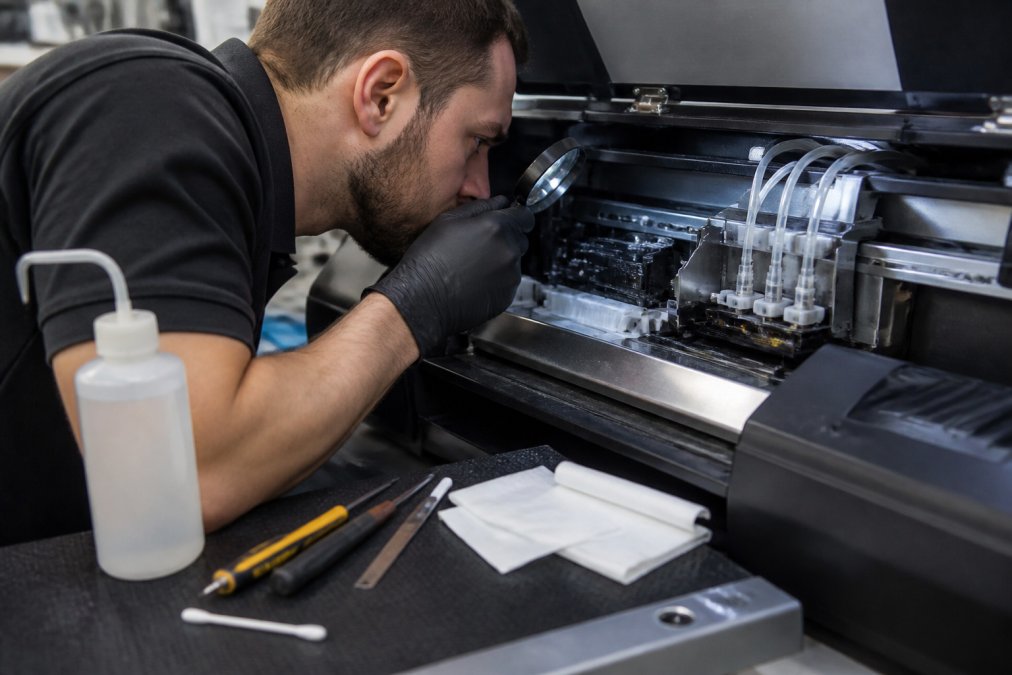
Hardware failures that need professional help:
If your printer won't power on, call support rather than spending hours troubleshooting. If you're getting consistent error messages and restarting doesn't help, escalate to support. If the print head isn't responding to cleaning cycles after two attempts, the print head itself may be failing and requires professional replacement. If you're losing ink pressure across multiple channels or hearing unusual noises, these are hardware-level problems requiring professional support.
The key distinction: if the problem is in your workflow (file, settings, substrate), you can usually fix it yourself. If the problem is in the printer's hardware or firmware, professional support is your fastest path to resolution.
Conclusion
Choosing a DTF support provider is choosing between constant production stress and reliable operations. The difference between "24/7 availability" and genuine reliable 24/7 DTF support comes down to specific, written commitments about response times, the technical depth of the support team, and whether they help you prevent problems or only fix them after they've already cost you money.
BB5wholesale provides the kind of support that actually matters: real people available around the clock, automated monitoring that catches issues before they impact production, and technical expertise covering everything from file preparation through heat press settings through wash durability testing. With fast door-to-door delivery, remote diagnostics, and support specialists who understand the entire DTF workflow, you get the uptime your business depends on. Upload your gang sheet and experience the difference that genuine 24/7 support makes to your production schedule.
| Support Type | Response Time | Coverage | Best For |
|---|---|---|---|
| Basic email/phone | 4-8 hours | Software troubleshooting only | Low-volume operations |
| Extended with diagnostics | 1-2 hours | Remote monitoring + troubleshooting | Medium-volume shops |
| Comprehensive with on-site | 1 hour critical | Full service + parts replacement | High-volume production |
| Premium with preventative | Proactive alerts | Scheduled maintenance + monitoring | Mission-critical operations |
UK Competition and Markets Authority guidance on service standards provides additional context on what constitutes fair and transparent service commitments. Understanding your rights as a business customer helps you evaluate support contracts more effectively and ensures you're getting genuine value rather than marketing claims.
Frequently Asked Questions
What should I look for in reliable 24/7 DTF support?
Look for providers offering documented response time commitments (typically under 2 hours for urgent issues), access to real technical staff rather than automated systems, and clear escalation procedures. Verify they cover your specific hardware, offer both remote diagnostics and on-site support options when needed, and provide preventative maintenance guidance. Check whether their support includes help with print quality assurance, substrate compatibility, and gang sheet optimisation. Ask about their uptime guarantees and what happens if your equipment fails during peak production times.
What is an SLA and why does it matter for DTF printer support?
A Service Level Agreement (SLA) is a formal contract defining response times, resolution targets, and support availability. For DTF support, an SLA specifies commitments like 'response within 1 hour for critical issues' or '99% uptime guarantee.' This matters because it protects your business: you know exactly when help arrives, what compensation you receive if targets are missed, and whether support includes remote diagnostics or requires on-site visits. Without an SLA, support quality depends on goodwill rather than contractual obligation. Review whether the SLA covers print head cleaning, ink curing problems, and wash durability issues specific to your workflow.
How can I prevent DTF printer downtime with proper maintenance?
Establish a preventative maintenance schedule based on your production volume and the manufacturer's guidelines. This typically includes weekly print head cleaning cycles, monthly ink system checks, and quarterly deep maintenance of substrate feed mechanisms. Keep detailed logs of maintenance performed, print quality issues, and any support calls. Use automated workflow monitoring to catch colour accuracy drift or print resolution problems before they affect finished goods. Most reliable support providers offer maintenance templates or checklists; ask for these when you sign up. Preventative maintenance reduces emergency support calls by 60-70% and extends equipment life significantly.
What's the difference between remote diagnostics and on-site support for DTF issues?
Remote diagnostics allow a technician to access your system via software to identify software, colour profile, or file preparation problems without visiting your location. This is fast (often resolving issues in 30 minutes) and cost-effective. On-site support is necessary for hardware failures like print head clogs, ink curing problems, or mechanical issues with the heat press or substrate feed. Reliable providers offer both: remote diagnostics first to rule out software issues, then escalate to on-site if hardware replacement or recalibration is needed. For small businesses running 10-15 orders monthly, remote support typically handles 80% of issues; on-site visits are reserved for genuine hardware faults.
This article was written using GrandRanker