


Reducing DTF Printing Waste for Higher Margins

Table of Contents
- Why DTF Printing Waste Directly Impacts Your Profit Margins
- Optimising DTF Gang Sheets to Minimise Material Loss
- Calibrating Printer Settings and Print Head Alignment
- Minimising Print Errors in Custom Apparel Production
- Using a DTF Printing Cost Calculator for Accurate Margins
- Maintenance Schedules and Consumable Quality to Prevent Waste
- Scaling Production While Keeping Waste Under Control
- Frequently Asked Questions
Last Updated: September 22, 2026
Why DTF Printing Waste Directly Impacts Your Profit Margins
Reducing DTF printing waste is not just an operational concern, it's a direct lever on your bottom line. Every scrap of film, every misaligned print, every failed transfer cuts into margins that should be yours to keep.
The maths is straightforward. If you're printing gang sheets and losing 15-20% of material to waste, you're giving away profit on every single job. A £100 order becomes £80-85 in actual value. Scale that across 50 orders a month, and you're leaving thousands of pounds on the table.
Most small apparel shops don't track waste properly. They bin failed prints without calculating the cost or recognising fixable patterns.
Businesses that track and optimise waste consistently outperform those who don't.
Waste reduction requires understanding where waste happens, then fixing the specific points that matter most.
Optimising DTF Gang Sheets to Minimise Material Loss
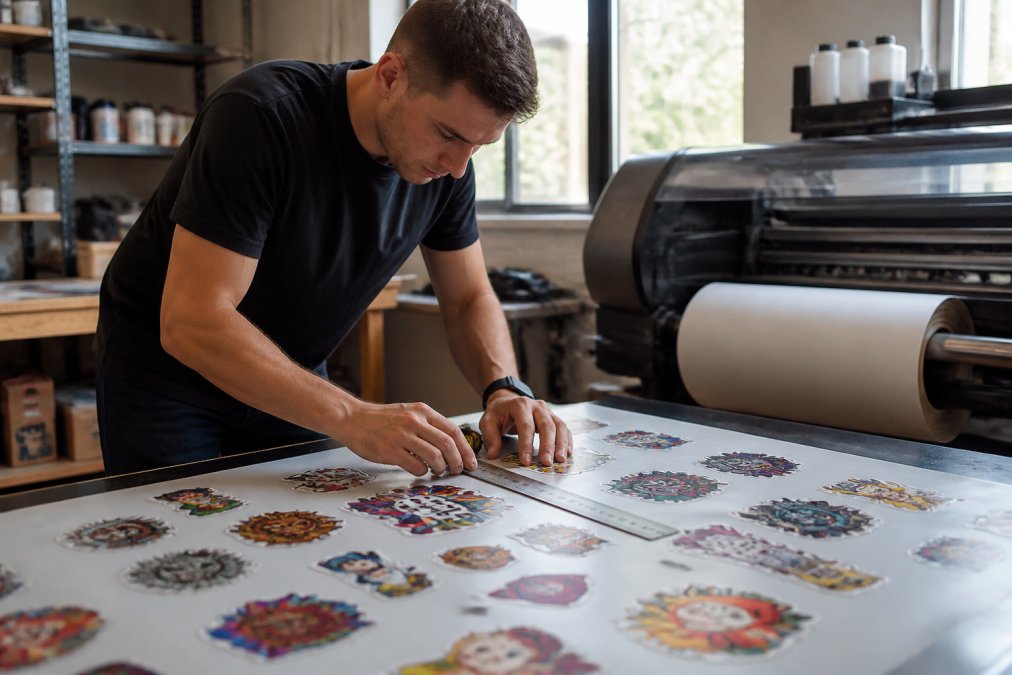
Gang sheet optimisation is where most waste reduction begins. Fit more designs into the same sheet size by arranging them intelligently, and your cost per garment drops.
Key strategies for gang sheet optimisation:
- Nest designs tightly without overlapping or touching transfer boundaries
- Rotate designs to fit odd shapes and maximise horizontal space
- Group similar-sized designs together to reduce repositioning time
- Leave minimal margins between designs, typically 2-3mm is enough
- Use software that calculates nesting automatically rather than arranging by hand
The difference between a poorly nested sheet and an optimised one can be 25-30% more designs per sheet, directly lowering cost per garment. BB5wholesale's Build Your Gang Sheet tool handles this automatically, arranging designs to maximise space without manual positioning.
Common mistakes: leaving excessive space between designs (2-3mm is reliable) and not rotating designs to fit sheet dimensions. Check both orientations before finalising placement.
Calibrating Printer Settings and Print Head Alignment
Print head alignment and calibration directly affect transfer quality and waste. Misaligned heads produce blurry prints, colour shifts, and failed transfers.
Critical calibration points:
- Print head height: Too high and ink doesn't adhere properly; too low and the head scrapes the film
- Print density: Underinking produces pale, weak transfers; overinking wastes ink and can cause bleeding
- Nozzle alignment: Misaligned nozzles create colour registration errors and visible banding
- Colour profile: Incorrect profiles waste ink chasing colours that never match the design
Use automatic calibration routines regularly, ideally before every 50-100 prints or daily for high volume. For manual calibration, print a test sheet with colour bars and alignment marks, then look for colour shifts, banding, ink pooling, or misalignment. Adjust density and head height through software menus.
Properly calibrated printers waste 40-50% less material than uncalibrated ones, a misaligned printer fails 1 in 5 prints versus 1 in 50 for a calibrated printer.
Minimising Print Errors in Custom Apparel Production
Print errors are the biggest source of avoidable waste. When a print fails, pause and diagnose. Most errors fall into four categories: adhesion failure, colour registration error, ink coverage inconsistency, or curing defect. Identifying the category tells you exactly what to adjust.
Adhesion and powder-related failures: Symptoms include transfers that peel during pressing or powder that flakes off. Root causes: insufficient powder coverage (most common), powder applied too late (beyond 10 seconds), low curing temperature, or film contamination. Inspect under bright light after powder application for thin spots or clumping. For uneven coverage, standardise application technique and apply within 5 seconds of printing. For peeling transfers, verify curing oven temperature with a separate thermometer and increase curing time by 30 seconds.
Colour registration and banding errors: Symptoms include visible stripes, colour shifts, or misalignment between colour channels. Root causes: nozzle clogging, print head misalignment, incorrect ICC profile, or belt tension issues. Print a test sheet with solid colour blocks and examine under good lighting. For single-colour banding, run automatic nozzle cleaning; if it persists, the print head needs replacement. For multi-colour banding, check print head alignment in calibration menu. For colour shift, verify you're using the correct ICC profile for your printer model and film type.
Ink coverage inconsistency: Symptoms include pale sections, ink pooling, or uneven saturation. Root causes: print density too low or too high, inconsistent film tension, or ink viscosity issues. Print a solid colour block at your current density setting. If pale, increase density by 5-10% increments. Most DTF printers operate optimally at 80-95% density. Document your optimal setting and use it as baseline.
Curing defects: Symptoms include smudging ink, transfers that wash out, or warped film. Root causes: temperature too low or too high, insufficient time, or uneven heat distribution. After curing, touch the ink gently, it should feel dry, not tacky. Increase curing time by 1-2 minutes and retest. Most DTF systems cure optimally at 160-180°C for 3-5 minutes. If transfers still feel tacky at 5 minutes, increase temperature by 5°C.
Quality control checkpoint before pressing: Perform a quick tactile and visual inspection before pressing. Run your finger across the transfer, it should feel smooth and set. Reject any transfer with banding, colour shifts, thin coverage, or powder clumping. Keep a simple log of failures to identify patterns. If banding dominates, prioritise nozzle maintenance. If adhesion failures dominate, focus on powder application or curing parameters.
Using a DTF Printing Cost Calculator for Accurate Margins
A DTF printing cost calculator breaks down film, ink, powder, electricity, labour, and waste costs. The formula: Cost per garment = (Material cost + Labour cost + Overhead) / (Number of successful transfers). If you print 100 sheets and 15 fail, your cost spreads across 85 successful transfers, not 100. Most shops guess their waste rate at 5-10%; actual measurement often reveals 15-25%. Track waste for two weeks, then calculate your real cost. Reducing waste by just 5 percentage points typically saves hundreds of pounds per month.
Maintenance Schedules and Consumable Quality to Prevent Waste
Prevention is cheaper than correction. Focus maintenance on tasks that prevent quality degradation and jams, these directly increase waste. Equipment failure stops production but doesn't waste material; quality degradation wastes material on every print until fixed.
Print head and nozzle maintenance: Clogged nozzles are the most common cause of preventable waste, producing banding, colour shifts, or pale coverage. Run a nozzle check test every morning before production. If any colour shows gaps, run the automatic cleaning cycle immediately. A clogged nozzle undetected for a full shift wastes 20-30 sheets; a daily nozzle check costs 5 minutes and prevents that waste.
Film path and tension inspection: Inconsistent film tension causes registration errors, banding, and jams. Before loading a new roll, visually inspect the film path. Weekly, check film tension by hand, it should have slight resistance but not be difficult to move. Monthly, inspect feed rollers for wear. A single jam can waste an entire roll; preventing jams saves material directly.
Adhesive powder application system maintenance: Inconsistent powder application is a major source of adhesion failures. After every 50 prints, inspect the powder application head for caked-on powder or bristle wear. Weekly, clean the powder hopper with compressed air. Monthly, inspect powder for clumping and replace if open for more than 3 months. Replacing powder every 3 months and cleaning weekly can reduce adhesion failures by 70-80%.
Curing oven temperature verification: Curing temperature often drifts without notice. Use an external thermometer to verify actual temperature weekly and compare to the printer's display. If difference exceeds 5°C, recalibrate or replace the sensor.
Preventative maintenance schedule summary:
| Task | Frequency | Waste Prevention Impact | Condition-Based Trigger |
|---|---|---|---|
| Nozzle check test | Daily (before production) | Catches clogged nozzles before they waste sheets | Visible gaps in test pattern |
| Print head cleaning | Daily or as needed | Prevents banding and colour shift | Failed nozzle check |
| Film path inspection | Weekly | Prevents jams and registration errors | Visible wrinkles or debris |
| Film tension check | Weekly | Prevents registration errors and film damage | Tension feels inconsistent |
| Powder applicator cleaning | Weekly | Ensures even powder coverage | Visible caked powder or bristle wear |
| Powder replacement | Every 3 months | Prevents clumping and uneven application | Powder is clumpy or discoloured |
| Curing temperature verification | Weekly | Prevents adhesion failures | Temperature drift exceeds 5°C |
| Feed roller inspection | Monthly | Prevents jams and misfeeds | Visible wear or flat spots |
| Curing oven service | Annually | Ensures consistent heat distribution | Temperature drifting or uneven curing |
Scaling Production While Keeping Waste Under Control
As you grow, waste can grow with you if you're not careful. Higher volume means more opportunities for errors.
- Exact printer settings for each design type
- Powder application technique and quantity
- Curing temperature and time
- Quality inspection checkpoints
- Troubleshooting steps for common errors
Frequently Asked Questions
How can I optimise my gang sheets to reduce DTF waste?
Arrange designs with minimal spacing between them using automated nesting software or manual layout tools. BB5wholesale's Build Your Gang Sheet option lets you fit multiple designs on one sheet, reducing material waste significantly. Group similar-sized designs together, use the full sheet dimensions, and test layouts before printing. Proper gang sheet utilisation can reduce material cost per garment by 15-25%.
What are the most common causes of waste in DTF printing?
Misaligned print heads cause colour registration issues and unusable transfers. Poor gang sheet layout leaves large empty areas. Incorrect curing system settings damage transfers during heat application. Ink smudging and adhesive powder application errors ruin finished products. Using low-quality consumables leads to higher defect rates. Regular calibration and maintenance prevent most of these issues.
How do I calculate DTF cost per garment accurately?
Use a DTF printing cost calculator to factor in ink consumption per design, film and adhesive powder per transfer, labour time, and overhead. Divide total production costs by number of garments printed. Include failed prints in your calculation. For gang sheets, divide the total sheet cost by the number of designs on it. This reveals your true profit margin and helps identify which designs are profitable at your current pricing.
Can better maintenance reduce DTF printing costs?
Yes. Regular print head calibration prevents misalignment-related waste. Cleaning the curing system maintains consistent transfer quality. Checking adhesive powder application equipment ensures proper coverage without excess. Scheduled maintenance prevents unexpected production downtime, which forces reprints and material loss. A simple monthly maintenance routine can reduce waste by 10-20% and extend equipment life.