


How to Maintain DTF Printers for Longevity: 2026 Guide

Table of Contents
- Why DTF Printer Longevity Depends on Preventative Maintenance
- DTF Printer Daily Maintenance Checklist
- How to Clean DTF Printheads Without Damaging Them
- DTF Printer Maintenance Schedule: Weekly, Monthly and Quarterly Tasks
- White Ink Circulation, Dampers and Waste Ink Management
- Environmental Control: Temperature, Humidity and Contaminants
- Troubleshooting Common Maintenance Errors
- Long-Term Storage, Safety and Maintenance Costs
- Frequently Asked Questions
Last Updated: September 13, 2026
Why DTF Printer Longevity Depends on Preventative Maintenance
The biggest factor in how to maintain DTF printers for longevity is not the machine brand, it is whether you maintain DTF printers as a daily habit or an emergency response. This guide from BB5wholesale covers the routines that keep printheads, ink lines and capping stations working for years.
DTF printers are unforgiving: white ink settles, nozzles dry out and waste ink accumulates whether you print or not. Neglect any of the three and you will replace parts far sooner than you should. Most breakdowns are maintenance failures, not manufacturing faults.
Below we cover daily, weekly and quarterly tasks, printhead cleaning, ink circulation, environmental control and long-term storage. Get these right and your printer will outlast its warranty by a wide margin.
DTF Printer Daily Maintenance Checklist
The daily routine is the foundation of any DTF printer maintenance schedule. It takes about ten minutes and prevents most clog-related failures.
Morning Start-Up Checks
Run a nozzle check before your first job. It reveals deflection, missing nozzles or partial clogs while they are still easy to clear.
- Check waste ink tank levels and empty if near capacity
- Confirm white ink cartridges are full and have been agitated
- Wipe the capping station with a lint-free cloth
- Verify humidity and room temperature are within range
- Run a nozzle check pattern and inspect for gaps
End-of-Day Shutdown Routine
Park the printhead over the capping station every night. Leaving it exposed lets ink dry in the nozzles, and dried white ink is the hardest clog to clear.
- Run a final head cleaning cycle
- Move the carriage to the capping station
- Switch off using the printer's own shutdown sequence
- Wipe any ink residue from the wiper blade
- Log any faults or odd print behaviour for the next morning
How to Clean DTF Printheads Without Damaging Them
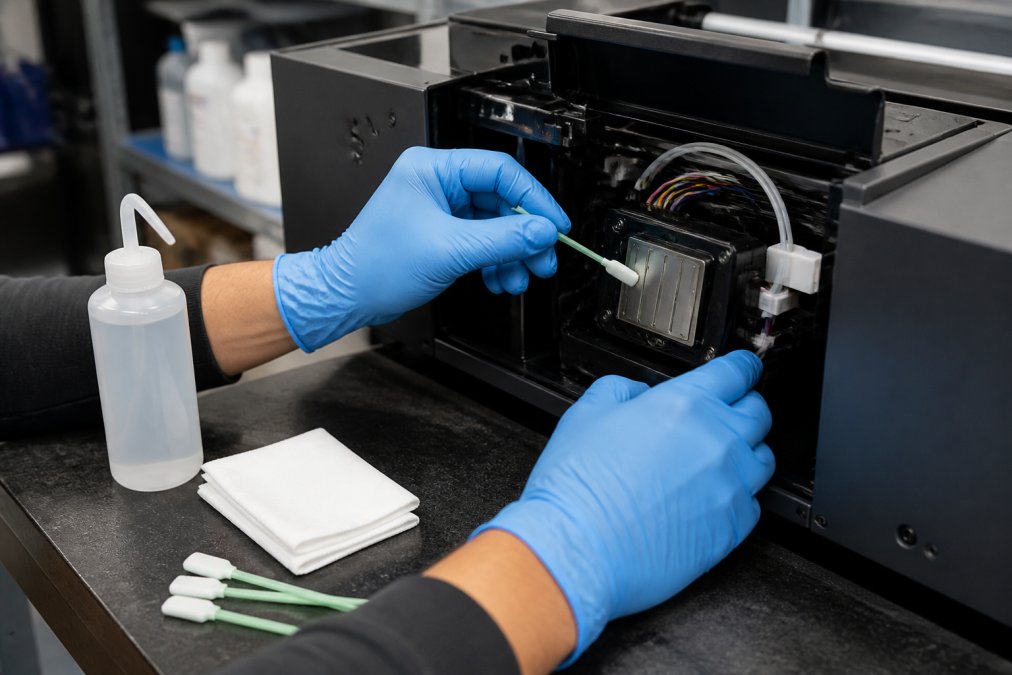
Learning how to clean DTF printheads correctly protects the machine's most expensive component. The rule: clean gently, clean often, and never let the printhead surface dry out.
Nozzle Checks and Head Cleaning Cycles
The nozzle check is your diagnostic tool: it shows whether ink fires cleanly from every channel before a job starts.
Nozzle deflection is the early warning sign. If lines on the test pattern are skewed or faint, a single head cleaning cycle usually resolves it. Persistent deflection points to a deeper clog or a failing damper.
Capping Station and Wiper Blade Care
The capping station seals the printhead when idle, keeping nozzles moist; the wiper blade scrapes excess ink from the head during cleaning cycles.
Clean the wiper blade with a foam swab and a little cleaning fluid, and replace it when nicked, curled or stiff, a worn wiper smears ink across the printhead instead of removing it.
DTF Printer Maintenance Schedule: Weekly, Monthly and Quarterly Tasks
A tiered schedule spreads the workload and catches problems before they become expensive. Use this table as your reference.
| Frequency | Key Tasks | Why It Matters |
|---|---|---|
| Daily | Nozzle check, cap station wipe, waste ink check | Prevents clogs and overflow |
| Weekly | Deep head clean, damper inspection, ink line check | Maintains ink flow and pressure |
| Monthly | Wiper blade replacement, filter check, calibration | Restores precision and print quality |
| Quarterly | Firmware update, full system flush, environmental audit | Extends component lifespan |
Weekly tasks take about thirty minutes, monthly work an hour, and quarterly servicing catches the slow degradation daily checks miss.
White Ink Circulation, Dampers and Waste Ink Management
White ink is the most demanding fluid in a DTF printer: its dense titanium dioxide pigment settles quickly, so circulation and agitation are not optional. Get this trio wrong and you will see banding, blocked channels and mid-job dropouts long before the printhead wears out.
White Ink Circulation and Agitation
Most machines run an automatic circulation cycle when idle, pulsing ink through the lines every few hours. Do not disable it, but do not assume it is enough: ink sedimentation happens fastest in the white channel because the pigment is heavier than the carrier fluid, so even a working pump benefits from manual agitation.
- If your model has a shaker or agitator built into the white cartridge cradle, confirm it is actually running, a stalled agitator is a common silent failure.
- If your model requires manual agitation, follow the manufacturer's interval exactly. A common pattern is to shake or roll white cartridges or bags for 30-60 seconds before the first job of the day and again after any pause longer than a couple of hours.
- Never top up a white cartridge with fresh ink and assume it is mixed. Fresh ink sitting on settled pigment creates a density gradient that shows up as uneven white opacity across a gang sheet.
A simple check: print a small solid white block after agitation and look for mottling or a faint horizontal band. If it appears, the pigment has separated somewhere in the line, not just the cartridge.
Damper Diagnostics
Dampers regulate ink pressure at the printhead and smooth flow. They are cheap, fail quietly, and commonly cause recurring nozzle dropouts that cleaning cycles never fix.
Inspect dampers weekly for:
- Air bubbles in the ink chamber, usually a sign of a loose fitting or a cartridge running too low.
- Leaks or ink weeping around the seal, replace immediately; a leaking damper can drip onto the nozzle plate.
- Stiffening or discolouration of the membrane, the damper is no longer regulating pressure properly.
- Ink level inside the damper, a damper that will not refill points to a blocked line or a failing pump.
A failing damper typically shows up as inconsistent ink flow, recurring nozzle dropouts on one channel, or deflection that returns within a few prints of a cleaning cycle. If you have cleaned twice and the same channel drops out, test the damper before you blame the printhead.
Waste Ink Management
Waste ink accumulates from every cleaning cycle, purge and nozzle check, so the tank fills faster than most operators expect. A full tank triggers faults and, on some machines, stops printing mid-job, the worst possible time to discover it.
- Empty the waste tank on a fixed schedule rather than waiting for the warning. If you run daily cleaning cycles, check the level every morning and empty at around two-thirds full.
- Some waste inks contain a flocculant or coagulant that separates pigment from carrier fluid. Follow the ink manufacturer's guidance on how long waste can sit before it thickens or sets.
- Never pour waste ink down a drain or into general waste (gov.uk). It is a chemical waste stream and must go through an approved route, see the safety section below.
- Keep a spare waste tank or liner on the shelf. Running out mid-job is entirely avoidable.
Environmental Control: Temperature, Humidity and Contaminants
Humidity control is the most overlooked part of DTF printer maintenance and the cheapest problem to fix. Low humidity dries ink in the nozzles and accelerates clogging; high humidity affects curing, powder adhesion and transfer release. Neither extreme is kind to a printhead.
Why Humidity Matters More Than Temperature
Water-based DTF inks, especially white, rely on ambient moisture to stay workable in the nozzle. When relative humidity drops, ink at the nozzle meniscus dries faster between passes, producing the classic pattern of a clean morning nozzle check and mid-afternoon dropouts.
Most practitioners find roughly 40-60% relative humidity and a stable 18-24°C keeps ink behaviour and curing consistent (hse.gov.uk). Treat those as working targets, not absolutes, your ink and film supplier's data sheet is the authority for your consumables, and some white inks prefer the upper end of that range.
What matters as much as the number is the stability. A room that swings from cold overnight to warm and dry by midday causes more clogs than a room that sits slightly outside the ideal range but never moves.
Measuring and Controlling the Environment
- Measure, don't guess. A simple digital thermo-hygrometer placed at printhead height costs very little and tells you what the machine is actually breathing. A wall-mounted unit on the other side of the room can read several points off.
- Avoid the obvious traps. Do not place the printer near external doors, open windows, air conditioning vents or space heaters. Direct airflow across the printhead is a clog generator.
- Manage winter dryness. Cold air holds little moisture, and heating it drops relative humidity further. A small humidifier in the print room is often the single highest-return piece of maintenance equipment you can buy.
- Manage summer damp. High humidity slows drying and can affect powder application and curing. Dehumidification and good air movement help, but do not blow air directly at the printhead.
- Log it. Note humidity alongside your daily nozzle check. After a few weeks you will be able to correlate dropouts with conditions and fix the cause rather than the symptom.
Contaminants: Dust, Lint and Airborne Fibres
Dust and lint settle on the printhead, inside the capping station and on the wiper blade. They get dragged across the nozzle plate during cleaning cycles, causing permanent nozzle loss, and contaminate the ink surface in the capping station, which dries into a gritty residue.
- Keep the printer covered when idle. A purpose-made dust cover is better than a sheet, which sheds fibres.
- Keep the workspace clean and avoid storing cardboard, unsealed powder or lint-producing materials near the machine.
- Never use paper towels, shop rags or compressed air around the printhead. Compressed air drives dust into the nozzles rather than away from them.
- If you handle powder, keep it in a sealed container and away from the printer. Airborne adhesive powder is one of the worst contaminants for a DTF setup.
Troubleshooting Common Maintenance Errors
Most maintenance problems trace back to a handful of repeat mistakes. Here is how to spot and fix them.
- Over-cleaning: Too many head cleaning cycles waste ink and flood the capping station. Clean once, check, then decide.
- Dry printhead overnight: Forgetting to park the carriage causes hard clogs. Build it into your shutdown routine.
- Ignoring the wiper blade: A worn blade smears ink and causes streaks. Replace it on schedule, not when print quality collapses.
- Skipping circulation: Disabling white ink circulation leads to sedimentation and blocked lines.
- Using the wrong cloths: Paper towels and shop rags shed fibres that scratch nozzles. Use lint-free materials only.
If a clog will not clear after two cleaning cycles, stop. Let the printhead soak in cleaning fluid via the capping station overnight, then re-test. Repeated dry cleaning cycles damage the nozzle plate.
Long-Term Storage, Safety and Maintenance Costs
If the printer will sit idle for more than a week, prepare it properly: flush the ink lines, clean the printhead and capping station, and store the machine covered in a stable environment. Never leave white ink in the lines for long, it settles and hardens.
DTF cleaning fluids and inks are solvents. Wear nitrile gloves and eye protection, work in a ventilated area, store chemicals sealed and away from heat, and follow the safety data sheet supplied with your ink (hse.gov.uk). Dispose of waste ink through an approved route, never down a drain.
Maintenance costs are predictable if you plan for them. Inexpensive consumables, wiper blades, dampers, foam swabs, cleaning fluid, prevent far costlier printhead replacements. Budget for them as a running cost and your total cost of ownership drops sharply.
For businesses producing DTF transfers at volume, reliable supply of quality transfers matters as much as machine care. At BB5wholesale, we supply high-quality DTF and UV DTF transfers with a gang sheet builder that helps you plan production efficiently. Our 24/7 customer support and secure payment options mean you can focus on bringing your custom designs to life.
Frequently Asked Questions
Are DTF printers high maintenance?
They need consistent attention rather than heavy repairs. A daily routine of nozzle checks, printhead wiping and white ink circulation takes about 10 to 15 minutes. Skip those habits and you risk clogged nozzles, sediment build-up and costly printhead replacements. The printers that last longest are simply the ones maintained on a fixed schedule, not the ones bought at a higher price.
What is the daily maintenance routine for a DTF printer?
Each morning, run a nozzle check, shake the white ink cartridge or pouch, and confirm the waste ink tank has room. Before shutting down, clean the capping station, wipe the printhead with a foam swab and suitable cleaning fluid, and park the head correctly. Logging each task on a DTF printer daily maintenance checklist makes it easy to spot missed steps before they cause print quality problems.
How often should I perform a deep clean on my DTF printer?
A deep clean every two to four weeks suits most small shops, though high-volume production may need it weekly. This involves flushing ink lines, inspecting dampers, cleaning the wiper blade and capping station, and checking for ink sedimentation. Follow the DTF printer maintenance schedule in your manual and adjust it based on how many transfers you print each week.
Does humidity affect DTF printer maintenance?
Yes. Low humidity dries out ink in the nozzles and lines, while high humidity can affect how ink and powder behave. Aim for 40 to 60 percent relative humidity and a stable temperature, using a hygrometer to monitor conditions. Environmental control reduces clogging, keeps ink viscosity consistent and cuts the number of head cleaning cycles you need to run.
Keeping a DTF printer running for years comes down to consistency, not luck. The shops that get the longest life out of their machines are the ones that never skip a daily check. If you would rather spend your time designing than maintaining, BB5wholesale can supply the transfers you need with fast door-to-door delivery, more than ten secure payment methods and support available around the clock. Upload your gang sheet to BB5wholesale and get professional results without the downtime.