


DTF Transfers for Beginners: A Step-by-Step Guide

Table of Contents
- What You'll Need to Get Started with DTF Transfers
- Preparing Your Artwork and Design for DTF Printing
- How to Order Custom DTF Transfers Online
- Best Heat Press Settings for DTF Transfers
- Applying DTF Transfers to Your T-Shirts
- Caring for DTF Printed Garments After Production
- Common Mistakes to Avoid When Using DTF Transfers
- Conclusion
Last Updated: August 28, 2026
What You'll Need to Get Started with DTF Transfers
Making custom t-shirts with DTF transfers requires specific equipment: a DTF printer, heat press, PET film, adhesive powder, and a curing oven. A DTF printer is specifically designed to print water-based ink onto PET film, which acts as the transfer medium. It must accommodate your film width (typically 30cm or larger) and produce vibrant, durable prints.
A quality heat press gives you precise control over temperature, pressure, and dwell time, three variables that directly impact transfer adhesion and durability. Cheap heat presses with inconsistent pressure produce inconsistent results.
Adhesive powder is essential. After printing your design onto PET film, you apply adhesive powder to the wet ink while damp. This powder bonds with the ink and allows the design to transfer cleanly onto fabric when heated.
A curing oven solidifies the adhesive powder before pressing, preparing the transfer for application. Temperature and duration matter; too little curing causes transfer failure; too much risks damaging the film.
You'll also need blank t-shirts, design software, and a way to manage gang sheets if printing multiple designs at once. BB5wholesale's gang sheet builder tool simplifies this by allowing you to arrange multiple designs efficiently on a single sheet to maximise space and reduce waste.
Preparing Your Artwork and Design for DTF Printing
Your artwork quality directly determines your final product quality. Start with a high-resolution image at least 300 DPI (dots per inch) at your final print size (iso.org). Lower resolution creates blurry, pixelated results. Vector graphics are ideal; if using raster images, ensure they're large enough before designing.
Colour profile matters significantly. DTF printing uses CMYK colour mode, not RGB. Convert your design to CMYK before sending to print, as the colour shift can be surprising. Test with a small sample order first if working with specific brand colours.
White ink layers require special attention. White ink must be the base layer, printed first, with design colours on top. Your design software or RIP (Raster Image Processor) software needs to separate the white layer correctly. Most DTF providers handle this automatically, but verify with your supplier.
Don't mirror your artwork. With DTF transfers, print your design exactly as you want it to appear on the shirt. The transfer applies face-down onto fabric, so mirroring results in a backwards design.
File format matters. Most DTF providers accept PDF, PNG, or high-quality JPEG files. Avoid compressed or low-quality JPEGs, as compression artifacts will be visible in your final print.
How to Order Custom DTF Transfers Online
Ordering DTF transfers online is straightforward. Most suppliers, including BB5wholesale, follow a simple workflow: upload your design, choose transfer size, select quantity, and proceed to checkout.
Start by selecting your transfer size. Common sizes range from 10cm × 10cm up to 30cm × 40cm depending on your needs. Larger transfers cost more per unit but work better for oversized designs or apparel like hoodies. Smaller transfers are economical for detailed designs or multiple transfers on a single garment.
Upload your artwork file. Most suppliers provide clear guidelines about acceptable formats and resolution. BB5wholesale's ordering system accepts multiple formats and provides real-time feedback if your file doesn't meet specifications.
Consider gang sheets if ordering multiple designs. A gang sheet lets you print several different designs on a single sheet of PET film, dramatically reducing cost per transfer. BB5wholesale's Build Your Gang Sheet option lets you arrange designs yourself and optimise space before ordering.
Choose your quantity carefully. DTF transfers don't have high minimum order quantities. You can order as few as 5 or 10 transfers, making it practical for small shops or testing new designs. However, cost per unit decreases with larger orders.
Review the preview before confirming. Most suppliers show how your design will look on the PET film. Check for colour accuracy, sizing, and positioning.
Delivery time typically takes 5-10 working days from order confirmation. Express options exist but cost more. Factor this into your planning if you have customer deadlines.
Payment security matters. Verify that the supplier uses secure payment processing. BB5wholesale offers more than 10 different secure payment methods, giving you flexibility and peace of mind. Check for SSL encryption before entering payment information.
Best Heat Press Settings for DTF Transfers
Heat press settings determine whether your transfers adhere properly and last through repeated washing.
Temperature, Pressure and Dwell Time
Temperature typically ranges from 150°C to 180°C for DTF transfers, depending on your specific film and adhesive powder (peer-reviewed research). Most beginners start at 160°C and adjust from there. Too low and the adhesive won't fully cure; too high and you risk scorching the film or damaging the fabric.
Pressure settings vary by heat press model, but the principle is consistent: you need enough pressure for full contact between transfer and fabric, but not so much that you crush the design or damage delicate fabrics. For cotton t-shirts, most operators use 3-4 bars of pressure. Lighter fabrics may need slightly less.
Dwell time typically ranges from 10 to 15 seconds for DTF transfers. This is long enough for heat to transfer through the PET film and cure the adhesive, but short enough to avoid heat damage. Document your successful settings and stick with them for consistency.
Hot Peel vs Cold Peel Techniques
After pressing, you remove the PET film from the garment. Hot peel means removing the film immediately while the transfer is still hot. This technique works well for most designs and is faster. The adhesive is still pliable when hot, making the film peel away cleanly.
Cold peel means letting the transfer cool completely before removing the film. Cold peel works better for detailed designs with fine lines or intricate artwork. The cooled adhesive is more stable, reducing the chance of fine details lifting with the film.
For solid colour designs or simple graphics, hot peel is faster and sufficient. For detailed artwork with thin lines or small text, cold peel gives you more control and better results.
Applying DTF Transfers to Your T-Shirts
First, prepare your garment. Wash and dry new t-shirts to remove sizing or finishes that might prevent adhesion. Some operators lightly pre-press the shirt to remove wrinkles and ensure a flat surface.
Position your transfer on the shirt exactly where you want it. Centering is important for appearance. Take your time here, as repositioning after pressing is difficult.
Close the heat press and apply your pre-determined settings. Consistent pressure across the entire transfer is critical. If you notice edge peeling after pressing, your pressure distribution may be the issue.
Once the dwell time is complete, open the press carefully. If using hot peel, remove the PET film immediately in one smooth motion. Pull at a shallow angle rather than straight up. If using cold peel, let the shirt cool first, then peel.
Check the transfer immediately after peeling. The design should be fully adhered with no lifting edges or gaps. If edges are lifting, your temperature or dwell time likely needs adjustment.
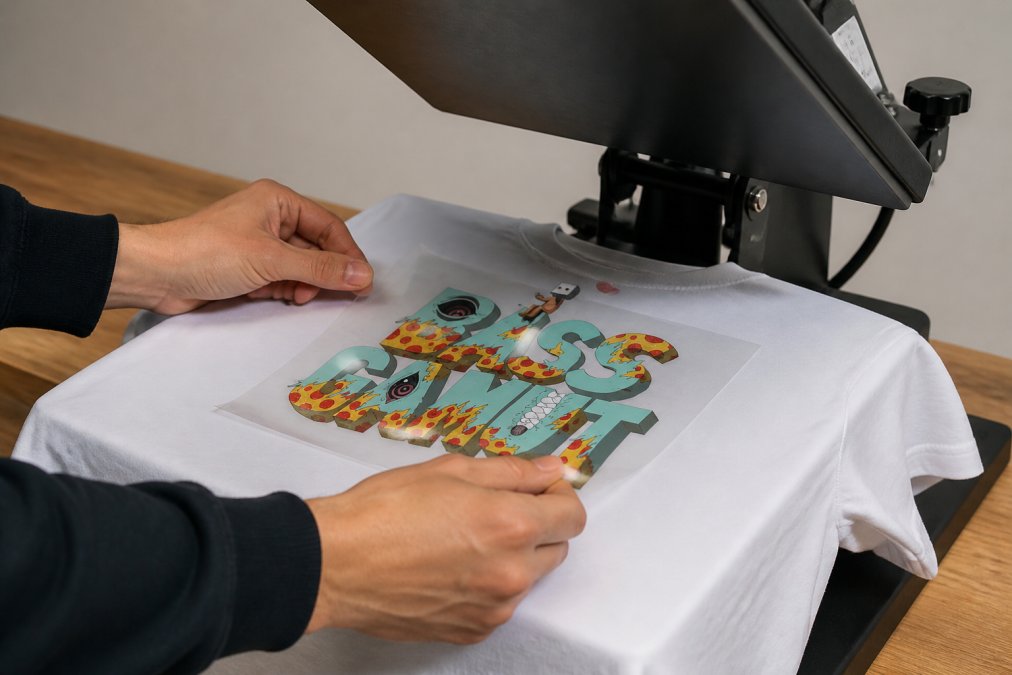
Allow the shirt to cool completely before handling or stacking.
Caring for DTF Printed Garments After Production
How your customers care for their DTF-printed shirts determines how long the prints last. Wash inside-out to protect the printed design from direct friction and abrasion.
Use cold water for the first few washes. Hot water can weaken the adhesive bond, particularly in the first 24-48 hours after pressing. After 5-10 washes, warm water becomes acceptable.
Avoid bleach and harsh detergents. Standard laundry detergent is fine, but oxygen-based cleaners and chlorine bleach can fade colours or damage ink. Gentle detergents work better for printed garments.
Dry on low heat or air dry. High heat from tumble dryers can degrade the transfer over time. Line drying or low-heat drying extends print life significantly.
Don't iron directly over the printed design. If ironing is necessary, iron the back of the shirt or use a pressing cloth as a barrier.
Provide clear washing instructions to your customers. Many quality issues blamed on the printer are actually caused by improper care.
Common Mistakes to Avoid When Using DTF Transfers
Skipping the curing step is common. Some operators try to press transfers immediately after printing, before the adhesive powder is cured. This results in transfers that don't adhere properly or peel within a few washes. Always allow proper curing time, typically 30-60 seconds in a curing oven at the correct temperature.
Inconsistent heat press settings cause the most visible problems. Document your successful settings and follow them precisely. Small variations compound quickly across multiple garments.
Using low-quality or damaged PET film leads to tears during peeling. Inspect your film before pressing. Store film flat in a cool, dry place to prevent damage.
Overloading gang sheets causes registration problems. While maximising space is economical, cramming too many designs onto one sheet can cause misalignment. Leave adequate spacing between designs, typically at least 2cm.
Not testing with new designs or suppliers is costly. Always order a small test batch before committing to large quantities. This catches design issues, colour problems, or supplier inconsistencies before wasting money on a full order.
Applying transfers to unwashed garments sometimes causes adhesion issues. New fabric often has finishes that prevent proper bonding. Washing removes these finishes and improves adhesion dramatically.
Ignoring pressure distribution problems on your heat press creates edge peeling. If transfers consistently peel at the edges, your heat press may not be applying even pressure.
DTF transfers offer beginners an accessible entry point into custom apparel production. The process is straightforward once you understand your equipment and settings. BB5wholesale makes this easier with tools like their DTF Transfers By Size option and intuitive gang sheet builder, giving you professional-quality prints without the steep learning curve. Start with proper equipment, document your settings, and commit to testing before scaling.
Frequently Asked Questions
What equipment do I actually need to start making custom t-shirts with DTF transfers?
You need a DTF printer (or access to one via a printing service), a heat press, blank t-shirts, and PET film. If you're outsourcing printing, you only need a heat press and blanks. A heat press is essential, regular irons don't provide the consistent pressure and temperature needed for durable DTF transfers. Many beginners start by ordering pre-made DTF transfers from suppliers like BB5wholesale, which eliminates the need for a printer initially.
How long do DTF transfers last on clothing after washing?
High-quality DTF transfers typically last 50-100+ washes when applied correctly and cared for properly. Durability depends on pressing temperature, dwell time, pressure settings, and post-production care. Washing in cold water inside-out, avoiding harsh detergents, and air-drying extends print life significantly. Proper application using the recommended heat press settings ensures long-lasting results that withstand regular wear and washing.
Can I use a regular household iron instead of a heat press for DTF transfers?
No. Household irons cannot deliver the consistent, high pressure and controlled dwell time required for DTF transfers. Heat presses apply even pressure across the entire transfer, ensuring proper adhesive powder activation and ink curing. Irons create uneven results, poor adhesion, and premature peeling. Investing in a proper heat press is non-negotiable for professional, durable results.
What makes DTF transfers better than vinyl or screen printing for custom t-shirts?
DTF transfers offer photographic-quality colour reproduction, handle complex multi-colour designs without setup costs, and require no weeding or pre-treatment. Unlike vinyl, DTF works on any fabric colour and texture. Compared to screen printing, DTF has lower minimum order quantities, faster turnaround, and no setup fees. For small businesses and beginners, DTF transfers provide professional results with minimal investment and maximum flexibility.
This article was written using GrandRanker