


Why DTF Transfers Are Cracking: Fixes & Prevention

Table of Contents
- Why DTF Transfers Are Cracking: Common Causes
- DTF Curing Temperature Guide: Getting It Right
- How to Fix Cracked DTF Prints: Step-by-Step Solutions
- DTF Transfer Washing Instructions for Maximum Durability
- Preventing Cracks Before Production Starts
- Troubleshooting Specific Cracking Patterns
- Conclusion
Last Updated: August 12, 2026
Why DTF Transfers Are Cracking: Common Causes
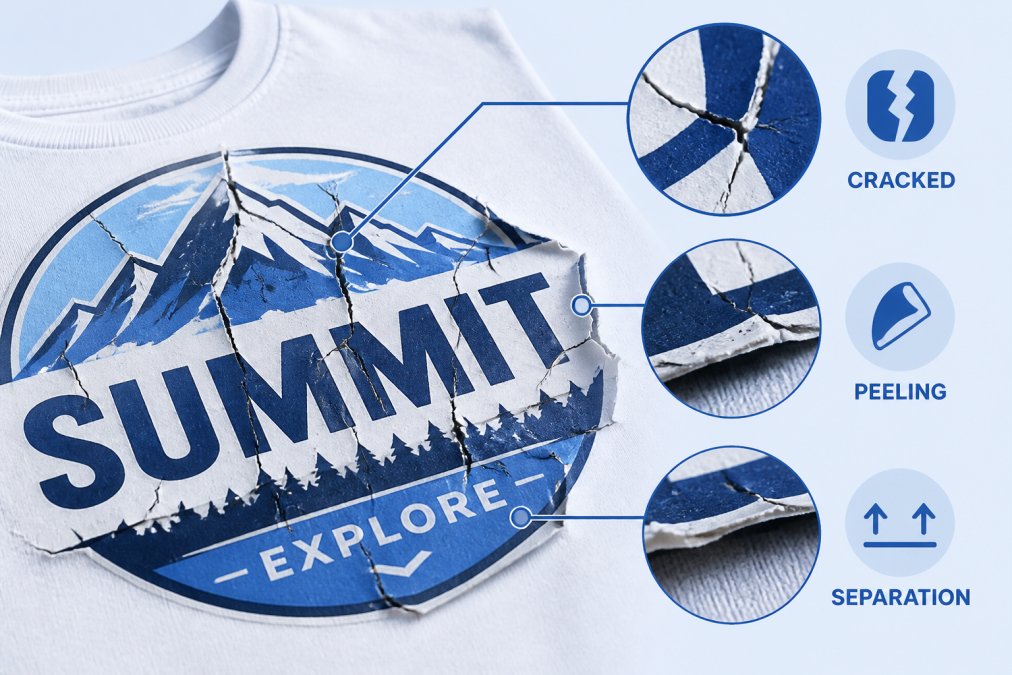
DTF transfers cracking is one of the most frustrating problems in custom apparel production. The issue isn't random, it's almost always traceable to a specific step in your workflow. Root causes fall into four main categories: heat press settings, adhesive powder curing, film and ink quality, and fabric preparation.
Incorrect Heat Press Temperature Settings
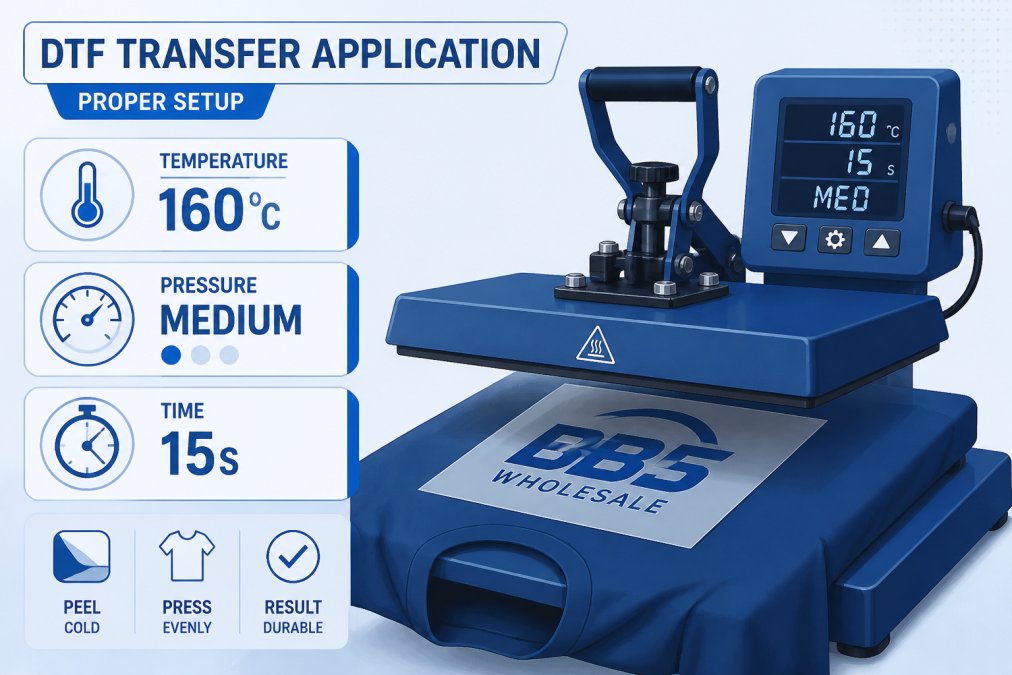
Heat is the most common culprit. Too much heat makes ink brittle; too little prevents proper adhesive bonding. Cotton typically requires 150-160°C for 10-15 seconds, while polyester blends need 140-150°C. Pressure must be firm enough for good contact without crushing the design.
Under-cured transfers feel flexible initially but become brittle when cool. Over-cured transfers develop a waxy coating that cracks when the garment stretches. The difference is often just 5-10 seconds. Start conservatively and adjust from there.
Many operators assume all heat presses are calibrated identically, they're not. Use a temperature gun to verify your press is actually hitting the set temperature. Machines often drift 10-15°C over time.
Improper Curing of Adhesive Powder
The adhesive powder bonds ink to fabric. Under-cured powder melts inconsistently, creating weak spots. Over-cured powder becomes stiff and cracks when the garment stretches.
Most DTF workflows apply powder immediately after printing, then cure in a heat tunnel or oven at 160-180°C for 3-5 minutes. This is different from heat press temperature, don't confuse the two steps. The heat press applies intense heat briefly; the curing oven applies moderate heat longer, allowing the adhesive to polymerize evenly.
Skipping the dedicated curing stage almost guarantees cracking. Moisture in your powder also affects bonding. Store adhesive powder in airtight containers with desiccant packs, especially in damp climates.
Low-Quality PET Film and Ink Issues
Cheap PET film has inconsistent surface texture, creating weak spots that crack under tension. Low-quality DTF ink can separate from the film during heat pressing. Premium PET film and ink formulations designed to work together ensure compatibility.
Check ink saturation as well. Under-saturated prints create thin layers that crack easily; over-saturated prints pool and create stiff areas that don't flex with fabric.
Fabric Preparation and Pre-treatment
Fabrics come from the mill with sizing and finishes that interfere with adhesive bonding. Pre-wash garments in warm water without fabric softener, which creates a barrier preventing bonding. Some operators use light steam treatment instead.
Tightly woven synthetics are harder to bond to than natural fibres. Cotton and cotton-blend fabrics accept DTF transfers more reliably than 100% polyester. For difficult fabrics, use a pre-treatment solution designed specifically for DTF.
Stretchy fabrics like spandex blends require flexible adhesive powder formulations. Standard powder formulated for rigid fabrics will crack on stretchy garments because it can't flex with the fabric.
DTF Curing Temperature Guide: Getting It Right
The difference between a transfer lasting years and one cracking after three washes comes down to curing temperature and timing.
Understanding Under-Cured and Over-Cured Transfers
An under-cured transfer hasn't reached full polymerization. The adhesive powder feels soft and the ink layer slightly tacky. When washed, the adhesive hasn't bonded strongly enough to fabric fibres, so it releases under stress.
An over-cured transfer has been exposed to too much heat. The adhesive powder becomes rigid and brittle; the ink layer hardens into a plastic-like coating. When the garment stretches, the coating cracks, showing fine lines or spiderweb patterns.
The ideal state is full polymerization with retained elasticity. Most DTF powder formulations reach full cure at 170°C for 4 minutes. Some premium powders cure faster at 180°C for 2 minutes; budget powders need longer at lower temperatures. Check your powder manufacturer's specifications.
Most heat tunnels aren't perfectly calibrated. Use an infrared thermometer to check multiple spots inside your tunnel. Significant variation may require professional calibration.
Dwell Time and Pressure Settings for Durability
For most cotton garments, aim for 10-15 seconds at 150-160°C with medium-firm pressure. This gives heat time to activate the adhesive powder without over-curing the ink layer.
Polyester and synthetic blends need lower temperature (140-150°C) with the same dwell time because synthetics are heat-sensitive. The relationship between dwell time and pressure is important: increased pressure allows slightly reduced dwell time; reduced pressure requires longer dwell time.
After applying the transfer, let the garment cool for at least 30 seconds. The adhesive powder is still setting during cooling. Moving the garment while hot can shift the transfer, creating stress points that crack later.
How to Fix Cracked DTF Prints: Step-by-Step Solutions
Diagnosing the Root Cause of Cracking
Fine lines or spiderweb cracks across the entire design usually mean over-curing. Dial back your curing oven temperature and dwell time.
Large chunks peeling away suggest under-curing or poor adhesive powder bonding. Increase your curing temperature by 5-10°C and extend dwell time by 1-2 minutes. Test on scrap fabric first.
Cracking along design edges but not the centre often points to uneven heat press pressure. Check that your heat press platen is level and platens are parallel.
Cracking appearing only after washing suggests inadequate fabric preparation. Pre-treat your next batch with a DTF pre-treatment solution.
Brittle ink that cracks without wearing the garment points to low-quality film or ink. Consider switching suppliers if you've ruled out temperature and curing issues.
Adjusting Heat Press Parameters for Existing Stock
Apply light pressure and low heat (around 120°C) for 5-10 seconds to loosen the transfer slightly, then re-press at corrected settings. Results are unpredictable; prevention is better than fixing after the fact.
Document your exact settings: temperature, pressure, dwell time, and curing oven parameters. Adjust only one variable at a time. Keep a log of which settings work for which fabric types.
DTF Transfer Washing Instructions for Maximum Durability
Pre-Wash and First-Wash Best Practices
Wait at least 24 hours after applying a DTF transfer before the first wash. The adhesive powder needs time to fully set.
Wash in cold water on a gentle cycle. Hot water softens the adhesive powder; aggressive agitation cracks the ink layer. Turn the garment inside out to protect the transfer from direct drum contact.
Avoid fabric softener entirely, it creates a barrier promoting peeling. Skip washing with rough fabrics like denim or towels, which can catch and pull transfer edges.
For the first wash, wash alone or with similar light garments. Don't overload the machine. Transfers are most vulnerable during the first few washes.
Long-Term Garment Care to Prevent Peeling
Wash in cold water every time. Warm or hot water gradually weakens the adhesive bond.
Dry on low heat or air dry. High heat in the dryer can soften the adhesive powder and cause peeling.
Avoid bleach and harsh chemicals. Use mild detergents designed for delicate fabrics.
Iron on low heat if needed, ironing the back only. Never iron directly on a DTF transfer.
Store garments flat or folded loosely. Hanging heavy garments stresses the transfer.
Preventing Cracks Before Production Starts
Fabric Compatibility and Elasticity Considerations
Cotton and cotton-rich blends (80% cotton or higher) are ideal for DTF transfers. The natural fibres grip adhesive powder reliably.
Polyester blends work well with adjusted heat settings. Use lower temperatures (140-150°C) because polyester is heat-sensitive.
High-elasticity fabrics like spandex blends require flexible adhesive powders designed specifically for high-stretch applications.
100% polyester is most challenging. Pre-treat with a DTF pre-treatment solution and use flexible adhesive powder.
Avoid heavily textured fabrics like corduroy or velvet. The raised texture prevents even contact, creating weak spots.
Test any new fabric type before running production. This takes 30 minutes and prevents expensive failures.
Ink Saturation and Transfer Film Quality Checks
Check ink saturation by examining test transfers. Colour should be vibrant and even. Lighter areas suggest clogged printheads or low ink levels.
Examine transfer film surface under bright light. It should be smooth and uniform. Discard batches with streaks, spots, or inconsistent coating.
Test adhesive powder by running a small sample through your complete workflow. The transfer should remain flexible and well-bonded after washing.
Troubleshooting Specific Cracking Patterns
Brittle Ink Layer and Bonding Strength Failures
A brittle ink layer feels stiff and inflexible. When you bend the garment, the transfer cracks like dried paint. Reduce your curing temperature by 5-10°C and dwell time by 1-2 minutes.
If lower temperature doesn't help, your ink quality may be the issue. Budget DTF inks are formulated with rigid polymers that don't flex well. Switching to premium ink often solves this immediately.
Bonding strength failures show the transfer peeling cleanly rather than cracking. The ink is fine but not adhering to fabric. Increase curing temperature to 175°C and extend dwell time to 5 minutes. If the transfer still peels, pre-treat garments with a DTF pre-treatment solution.
Printhead Clogging and Ink Flow Problems
Inconsistent ink flow shows gaps, light areas, or streaks in designs. These weak areas are prone to cracking.
Printhead clogging is the most common cause. DTF inks are pigment-based and dry in the printhead if the machine sits idle for more than a few days. Run a cleaning cycle before every production run.
If cleaning doesn't resolve the issue, check ink levels. Low ink pressure creates uneven saturation. Refill cartridges and verify all ink lines are connected properly.
Ink flow problems also occur if print speed is too fast. Reduce print speed by 10-20% and test. Slower printing gives ink time to saturate the film evenly.
If issues persist across multiple runs, your DTF printer may need professional servicing. Printhead wear is normal over time, and worn printheads eventually need replacement.
Frequently Asked Questions
Why are my DTF transfers cracking after washing?
DTF transfers crack after washing when the adhesive powder hasn't fully cured or bonded to fabric fibres. Washing applies tensile stress to the ink layer, exposing weak polymerization. Common causes include under-curing during heat pressing, incorrect dwell time, or washing too soon after application. Ensure your transfers cure at the correct temperature for your fabric type, allow at least 24 hours before the first wash, and follow proper garment care instructions to prevent premature cracking.
What is the correct temperature for curing DTF transfers?
Most DTF transfers require 160-180°C for 10-15 seconds dwell time, depending on fabric type and transfer thickness. Cotton and cotton blends typically need 170°C, whilst synthetic blends may require slightly lower temperatures. Over-curing at temperatures above 190°C can cause brittle ink layers that crack easily, whilst under-curing leaves adhesive powder insufficiently bonded. Always test a sample transfer on your specific fabric before full production, and adjust based on how the ink feels and adheres after cooling.
How do I properly wash garments with DTF prints?
Wash DTF-printed garments inside-out in cold water with mild detergent on a gentle cycle. Avoid bleach, fabric softener, and high heat dryers, which weaken bonding strength. Wait at least 24 hours after pressing before the first wash. For best durability, air-dry or use low heat. Repeated washing with proper care can extend the life of your DTF transfer significantly, but tensile stress from hot water and rough handling will accelerate cracking and peeling.
Can I fix cracked DTF transfers without reprinting?
Minor surface cracks can sometimes be temporarily improved by re-pressing at slightly lower temperature and pressure to encourage adhesive powder to re-bond, but this rarely provides a permanent fix. If cracks are deep or widespread, the transfer will likely continue to fail with washing. Prevention is far more effective than repair. Focus on correct curing temperature, dwell time, and fabric pre-treatment during production to avoid cracking altogether.
The path from cracked transfers to durable, long-lasting prints is systematic. You identify the root cause, adjust one variable at a time, test thoroughly, and document what works. BB5wholesale supports this process with premium materials and 24/7 customer support, when you have questions about your specific setup, our team can help you troubleshoot and find solutions quickly.
Upload your gang sheet to get started with transfers designed to last, not crack.
This article was written using GrandRanker