


UV DTF Applications for Electronics: A 2026 Guide

Table of Contents
- What Are UV DTF Applications for Electronics?
- How UV DTF Works on Non-Porous Substrates
- UV DTF vs Vinyl for Electronics
- UV DTF Durability on Plastic and Metal
- Best Practices for UV DTF Application
- Heat Sensitivity and Signal Interference: What to Watch For
- Regulatory Compliance and Material Safety
- Frequently Asked Questions
Last Updated: September 19, 2026
What Are UV DTF Applications for Electronics?
UV DTF applications for electronics use ultraviolet-curable ink printed onto a transfer film, then bonded to hard surfaces with pressure alone, no heat press, no weeding, no direct printing. This guide from BB5wholesale covers how the process works, where it fails, and what to check before committing a client's order.
The appeal is obvious. A phone case, power bank, games controller or laptop lid is curved, heat-sensitive, or both, which rules out most decoration methods. UV DTF sidesteps that: the design is printed onto film, cured under UV light, and applied with a squeegee, so the device never sees heat.
That matters commercially: small electronics accessories are one of the fastest-moving categories for personalised merchandise, and shops that turn around branded batches quickly win repeat business.
How UV DTF Works on Non-Porous Substrates
The process has three stages: print, cure, transfer. Each one determines how well the finished decal holds.
UV DTF printing transfers a design printed with UV-curable ink onto a hard surface using an adhesive film carrier, with the ink cured under ultraviolet light before application rather than heat-fused afterwards.
Here's the sequence in practice:
- The print head lays down CMYK+W ink onto the transfer film. The white layer goes underneath the colour, which is what makes the design opaque on dark plastic.
- A curing lamp passes over the film, triggering polymerization. The ink goes from liquid to a solid, scratch-resistant layer in seconds.
- A protective B film is laminated on top, and a varnish layer is often applied for gloss and extra wear resistance.
- At application, the backing peels away, the design is pressed onto the surface, and the top film releases.
The chemistry matters less than the consequence: because the ink is already cured, the bond depends almost entirely on adhesive strength and surface energy, not heat. That's why non-porous substrates such as glass, metal, acrylic and hard plastic work so well, there's nothing to absorb into, so the adhesive sits on top and grips.
Where it struggles is low surface energy plastics. Polypropylene and some polyethylene blends resist adhesion, and no amount of firm squeegeeing will fix a substrate that doesn't want to bond. Test before you promise.
UV DTF vs Vinyl for Electronics
For electronics specifically, UV DTF beats vinyl on almost every measure except one: cost per unit on very simple single-colour work.
Vinyl is cut, weeded and applied. It handles flat surfaces and simple shapes well, and it's cheap. What it can't do is full-colour gradients, fine photographic detail, or multi-colour artwork without layering, which adds labour and thickness. On curved phone cases or controller shells, vinyl also lifts at the edges far sooner.
| Factor | UV DTF | Vinyl |
|---|---|---|
| Colour range | Full CMYK+W, gradients, photos | Limited by available stock |
| Weeding required | No | Yes |
| Heat press needed | No | Sometimes, for fabric grades |
| Curved surfaces | Good, with flexible film | Poor, edges lift |
| Setup time per design | Minutes | Longer for multi-colour |
| Best for | Detailed, multi-colour, low-volume runs | Simple single-colour decals |
UV DTF Durability on Plastic and Metal
Durability comes down to three things: the varnish layer, surface preparation, and what the item is exposed to afterwards.
A properly applied UV DTF decal on hard plastic or metal is scratch-resistant, waterproof and weather resistant. The varnish layer does the heavy lifting, it's the difference between a print that survives a pocket and one that scuffs in a week.
On metal and stainless steel, adhesion is generally excellent because surface energy is high. On hard plastics it's good, provided the surface is clean and free of mould release agents. On painted or coated metals, the weak point is often the paint, not the decal.
Failure is usually a care problem, not a product problem: high heat and harsh washing reduce adhesion and finish quality over time. On drinkware and electronics accessories, that means:
- Avoid dishwasher use
- Do not microwave decorated items
- Keep abrasive cleaners away from the finish
For electronics the risk is different: a phone case lives in a pocket with keys, a power bank gets thrown in a bag. Wear resistance matters more than weather resistance, and the varnish layer buys you that.
Best Practices for UV DTF Application
Clean, dry and pressure covers most of it, but the details are where orders get saved.
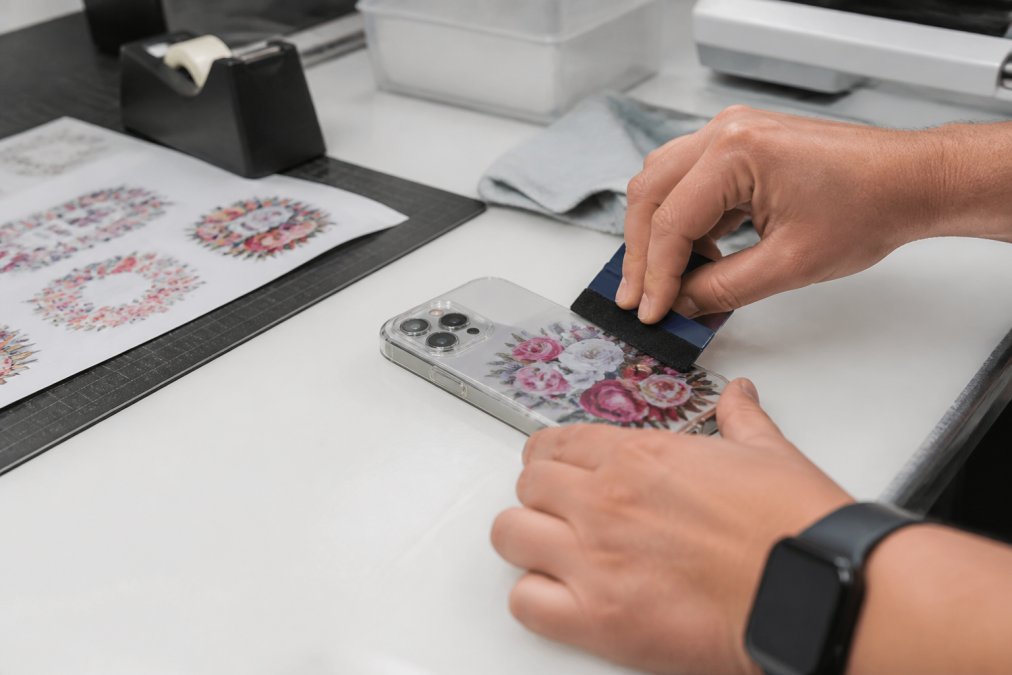
Work through this checklist every time:
- Wipe the surface with isopropyl alcohol and let it dry fully
- Handle the film by the edges only; oils from fingers kill adhesion
- Position the design before pressing, because repositioning lifts the adhesive
- Press firmly from the centre outwards with a squeegee, working out air bubbles
- Peel the top film back slowly at a low angle
- Let the applied decal rest before the item is handled or packed
A common mistake is rushing the peel: pull the top film fast and you'll drag fine detail with it, especially thin strokes and small text. Slow and low-angle is the whole technique.
For batch production, a gang sheet changes the economics. BB5wholesale's UV DTF Gang Sheet Builder lets you lay multiple designs onto one sheet, so a run of mixed phone cases or branded power banks comes off a single print. The UV DTF gang sheet option suits higher-volume runs where you fit as many designs as possible per sheet to cut material waste.
Heat Sensitivity and Signal Interference: What to Watch For
Two limitations separate a professional UV DTF operation from an amateur one, and neither appears in most guides.
Heat sensitivity. The application itself is heat-free, but the finished item still has to survive its own use, and electronics generate heat in ways a drinkware tumbler never does.
The mitigation is placement, not product. On a power bank, keep graphics away from the cell housing and charging port surround. On a games controller, avoid the area above the battery compartment and haptic motors. On a laptop lid, the hinge-side edge runs warmer than the centre. Test one unit through a full charge-and-discharge cycle before committing a batch, a 24-hour soak at normal operating temperature reveals whether your film is up to it.
Signal interference. This is the one nobody warns you about, and it is more nuanced than 'metal blocks signal'.
The practical rule: keep graphics clear of the areas marked on the device, and test one unit before you print fifty.
Regulatory Compliance and Material Safety
Compliance is where a lot of small print shops get caught out, and it's worth getting right before a corporate order lands. The rules fall into three buckets: what's in your ink and film, what happens to the device at end of life, and what you tell the buyer.
Restricted substances. If you are decorating consumer electronics, or anything that will be sold alongside them, the inks and adhesives you use need to be free of the substances restricted under the Restriction of Hazardous Substances regulations and the Registration, Evaluation, Authorisation and Restriction of Chemicals regulation.
Battery-containing devices.
The practical takeaways for a print shop:
- Keep a record of the materials used on each order, in case a client asks
- Ask suppliers for safety documentation on the ink and film you buy, and re-request it when formulations change
- Do not apply transfers to items intended for food contact or microwave use
- Label decorated drinkware with care instructions, as the product listings do
- For battery-containing items, avoid covering vents, charging contacts, or thermal interfaces
- If selling direct under your own brand, check whether WEEE producer registration applies to you
Frequently Asked Questions
Is UV DTF safe to use on electronic device casings?
Yes, when applied correctly. UV DTF transfers use a protective varnish layer that seals the design, and the adhesive is designed for non-porous surfaces like hard plastic, metal and glass. Avoid covering charging ports, speakers or sensors. The print itself does not interfere with device function as long as it sits flat. For best results, clean the casing with isopropyl alcohol before applying, and avoid dishwashing or microwaving decorated items as high heat can weaken the bond.
How long do UV DTF decals last on high-touch electronic items?
Lifespan depends on handling and surface prep. UV DTF durability on plastic benefits from a scratch-resistant varnish layer. Proper cleaning before application and avoiding harsh solvents extends the life.
Does UV DTF printing interfere with electronic components?
The transfer itself is a thin adhesive film with no conductive properties, so it will not interfere with internal components. Apply decals to external casings only, and keep them away from functional openings.
What are the main advantages of UV DTF over traditional vinyl stickers for tech?
UV DTF offers vibrant, high-resolution prints with a high-gloss finish and no weeding. UV DTF transfers can be applied to curved or irregular surfaces without wrinkling, making them ideal for phone cases, earbud cases and controllers. For small businesses, UV DTF gang sheets allow multiple designs on one sheet, reducing waste and production time.