


Why DTF Transfers Are Fading: Fixes That Work

Table of Contents
- Why DTF Transfers Are Fading: The Real Causes
- Best Heat Press Settings for DTF: Time, Temperature, and Pressure
- DTF Transfer Washing Instructions: Keeping Colour In
- How to Fix Peeling DTF Transfers: A Visual Diagnostic Guide
- Material Quality: Ink, Film, and Adhesive Powder
- How Humidity and Storage Affect Transfer Lifespan
- Prevention Checklist for Long-Lasting Prints
- Conclusion
- Frequently Asked Questions
Last Updated: September 9, 2026
Why DTF Transfers Are Fading: The Real Causes
Fading is the most common complaint about DTF transfers, yet the root cause is rarely the transfer itself; in fact, most DTF transfers fading issues trace back to process errors. When a print loses colour after a few washes, the problem usually traces back to one of three places: an incomplete curing stage during production, incorrect heat press settings during application, or improper garment maintenance after the transfer is pressed.
Nearly every fading issue is preventable. A direct-to-film transfer is a layered construction: ink, adhesive powder, and the film carrier. Each layer must be processed within a specific temperature window to bond correctly with the fabric substrate.
Best Heat Press Settings for DTF: Time, Temperature, and Pressure
The standard starting point for applying DTF transfers is 160°C for 15 seconds at medium to firm pressure. These settings work for most cotton and cotton-blend garments, but the correct combination depends on your specific heat press machine and the thickness of the transfer film.
The Mechanics of Heat and Pressure
When you press a DTF transfer, you are melting the thermoplastic adhesive powder so it flows into the fabric weave, and driving off residual moisture from the film and adhesive. Both processes require a specific energy input, which is a function of temperature, time, and pressure.
- Temperature: 160°C is the baseline because it is above the melting point of most polyester-based adhesive powders used in DTF production (typically 120-150°C). However, the temperature at the platen surface is not the temperature at the garment. Thick fabrics like hoodies act as insulators, so you may need to increase the platen temperature to 165-170°C to achieve the same adhesive flow at the fabric interface.
- Dwell time: 15 seconds is sufficient for a standard 100% cotton t-shirt. But dwell time must increase for fabrics with higher thermal mass. A 300gsm hoodie may require 20 seconds to allow heat to penetrate through the fabric to the adhesive layer. Conversely, thin performance fabrics like polyester blends can scorch or shrink if you exceed 15 seconds at 160°C.
- Pressure: Medium to firm pressure (approximately 40-60 psi on a pneumatic press) ensures the adhesive is forced into the fabric interstices. Too little pressure leaves the adhesive sitting on the surface, creating a weak mechanical bond. Too much pressure can squeeze the adhesive out from under the film, causing 'bleed-through' where adhesive marks appear on the reverse side of the garment.
Diagnosing Application Failures by Visual Cue
The visual evidence tells you which variable to adjust:
- Edge lifting after one wash: This is almost always a pressure problem. The edges of the transfer are the last points of contact, and if the platen is slightly domed or the garment has a seam nearby, the edges receive less pressure. Solution: use a pressure pad or pillow to equalise the surface, and increase dwell time by 2-3 seconds.
- Overall cloudy or milky appearance: This indicates the adhesive did not fully melt, which points to insufficient temperature. Check your platen with an infrared thermometer, many budget presses drift by 10-15°C from the dial setting.
- Shiny, glossy spots on the transfer: This is a sign of over-pressing, where the adhesive has melted and flowed excessively, creating a smooth surface that reflects light. Reduce dwell time by 2 seconds.
The Role of the Heat Press Pillow
A heat press pillow or pad is not an optional accessory. It compensates for uneven garment thickness (such as seams, zippers, or collars) and prevents the platen from cooling down when it contacts a thick area. Without a pillow, the platen may lose 5-10°C at the point of contact with a seam, leading to localised under-curing. For garments with chest pockets or side seams, always use a 1-2 cm silicone pillow.
Cold Peel vs. Hot Peel: Why It Matters
Most DTF transfers are designed for hot peeling (immediately after pressing) because the adhesive is still molten and can stretch slightly without tearing. Cold peel transfers require the film to cool to below 40°C before removal. If you hot-peel a cold-peel transfer, you will pull the adhesive away from the fabric while it is still soft, causing delamination. Conversely, cold-peeling a hot-peel transfer can leave a hazy residue. Always check the supplier's specification sheet.
Testing Your Settings Before Production
Before pressing a full order, run a test on the exact fabric you will use. Press a small sample at your chosen settings, then perform a 'stretch test': pull the fabric firmly across the print. If the transfer cracks or lifts, your adhesive bond is weak. Then wash the sample once at 30°C with a standard detergent. If it fails, adjust one variable at a time, do not change temperature and pressure simultaneously.
DTF Transfer Washing Instructions: Keeping Colour In
Garment maintenance determines how long a correctly pressed transfer will last. The single most important rule is to wash inside-out in cold water, which protects the print surface from direct abrasion against other clothing and the drum of the machine.
- Wash in cold water, ideally below 30°C
- Turn the garment inside-out before washing
- Avoid fabric softeners, which leave a film that can dull the print
- Air dry or tumble dry on low; high heat can soften and weaken the adhesive
Detergent Chemistry and Ink Stability
Many modern detergents contain optical brighteners and enzymes designed to break down protein-based stains. These same enzymes can attack the polymer binders in DTF ink, accelerating colour loss over repeated washes.
For printed garments, a mild, colour-safe detergent without bleach or optical brighteners is the safest choice. Powdered detergents are more abrasive than liquids and can gradually scratch the print surface. If you are washing a batch of printed samples to test durability, use the same detergent your customers will likely use, not a specialist formula, so the test reflects real-world conditions.
How to Fix Peeling DTF Transfers: A Visual Diagnostic Guide
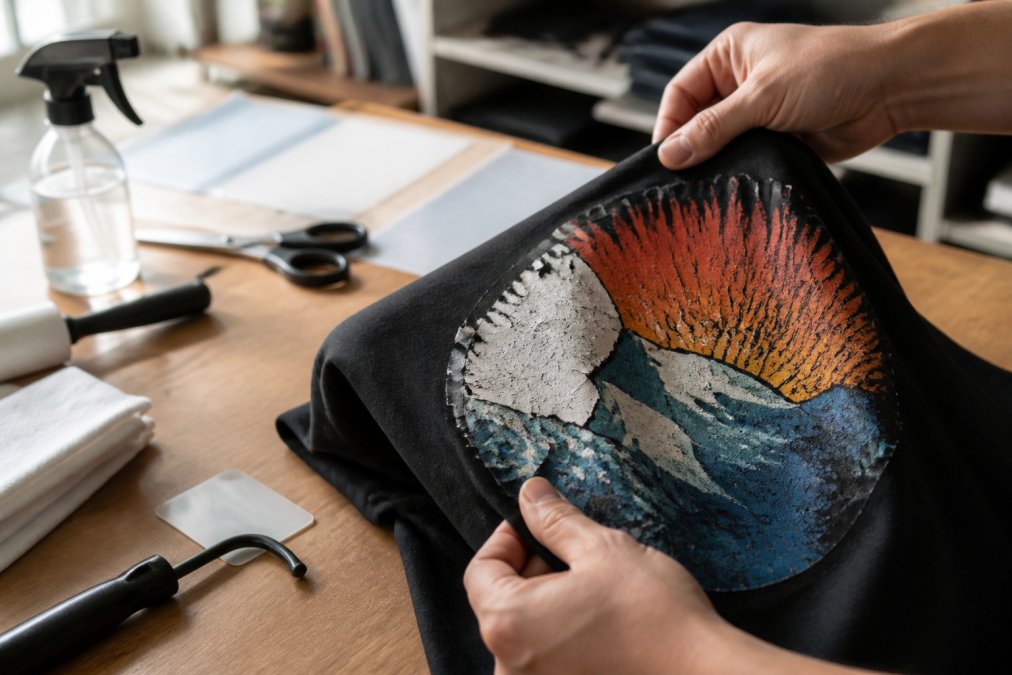
Peeling is a distinct failure mode from DTF transfers fading, and it demands a different fix. If the adhesive layer is still intact on the fabric but the ink has separated from it, the problem is under-curing during production. If the entire transfer lifts away in one piece, the issue is insufficient heat or pressure during application.
Press a small test transfer at slightly higher temperature and longer dwell time. If it survives a wash cycle without lifting, your application settings were the culprit. If it still peels, the transfer itself likely has an adhesive issue, and you should contact your supplier for a replacement batch.
Material Quality: Ink, Film, and Adhesive Powder
Not all DTF materials perform equally. The quality of the ink, the release characteristics of the film, and the particle size of the adhesive powder all influence how well a transfer survives washing. Low-cost films may release unevenly, leaving thin spots in the ink layer that fade faster. Cheap adhesive powders can contain oversized particles that fail to melt evenly, creating weak bonds.
Ink: Pigment Load and Binder Chemistry
DTF ink is a water-based dispersion of pigment particles suspended in a polymer binder. The two critical factors are pigment particle size and binder cross-linking density.
- Pigment particle size: Quality inks use pigments ground to a consistent sub-micron particle size (typically 0.1-0.5 micrometres). Larger particles settle faster in the printhead and produce less vibrant colours because they scatter light rather than absorbing it. If your prints look dull or washed out straight off the film, the ink may have poor pigment dispersion.
- Binder chemistry: The binder is what locks the pigment to the adhesive layer. Most DTF inks use a polyurethane or acrylic-based binder. The key difference is whether the binder cross-links during curing. A cross-linking binder forms a three-dimensional polymer network that is resistant to solvent attack from detergents. A non-cross-linking binder remains a linear polymer that can be slowly dissolved by repeated washing. You cannot tell which type you have from the bottle, but you can test it. Print a solid colour block, cure it, and then soak it in warm water with a standard detergent for 24 hours. If the ink bleeds or the water becomes tinted, the binder is not sufficiently cross-linked.
Film: Release Layer and Surface Energy
The PET film carrier has a silicone-based release layer that allows the transfer to peel away cleanly after pressing. The quality of this release layer determines how evenly the ink and adhesive separate from the film.
- Release consistency: Premium films have a uniformly coated release layer. Budget films may have thin spots where the silicone is uneven, causing the ink to stick to the film and peel away in patches when you remove it. This creates thin areas in the print that fade faster.
- Surface energy: The film must have a specific surface energy (measured in dynes/cm) to accept the ink without it beading up or spreading too much. If the surface energy is too low, the ink will not wet the film properly, leading to poor dot definition in halftones. If it is too high, the ink spreads excessively, blurring fine details. A simple test: print a fine line pattern and inspect it under a magnifying glass. Crisp, well-defined edges indicate correct surface energy.
Adhesive Powder: Particle Size Distribution and Melting Point
Adhesive powder is a thermoplastic polyurethane (TPU) powder that melts during the curing stage and bonds the ink layer to the fabric.
- Particle size distribution: Quality adhesive powders have a narrow particle size distribution, typically 80-200 micrometres. Oversized particles (above 300 micrometres) create lumps that do not melt evenly, leaving voids in the adhesive layer. Undersized particles (below 50 micrometres) can clog the powder shaker and produce a thin, weak adhesive layer. If you are applying powder manually, you can check the distribution by sifting a sample through a fine mesh sieve.
- Melting point range: Different TPU powders have different melting points, typically ranging from 110°C to 150°C. A powder with a higher melting point requires a higher curing temperature or longer dwell time. If your supplier changes their powder formulation without telling you, your curing settings may no longer be adequate. This is why it is essential to test every new batch of transfers, not just when you switch suppliers.
Halftones and the White Underbase Problem
Halftones and translucent prints are especially vulnerable to material quality issues. Areas with light ink coverage have less pigment to lose, so any degradation becomes visible sooner. The white underbase provides the opacity that prevents the garment colour from bleeding through the colour inks.
A common issue is a thin white underbase caused by under-printing or by using a low-opacity white ink. If the white underbase is too thin, the colour inks appear muddy or washed out because the dark fabric shows through. The solution is to verify that your white ink has sufficient titanium dioxide (TiO2) pigment load. Premium white DTF inks contain 25-30% TiO2 by weight. Budget inks may contain only 15-20%, requiring an extra pass to achieve the same opacity, which increases cost and can lead to ink build-up that cracks.
A Practical Material Testing Protocol
To avoid material-related failures, implement a simple testing protocol for every new batch of film, ink, or adhesive powder:
- Print a test pattern with solid blocks, fine lines, and a halftone gradient.
- Cure and press the test transfer onto a standard cotton t-shirt.
- Wash the garment three times at 30°C with a standard detergent.
- Inspect the print after each wash for fading, cracking, or lifting.
- Compare against a known-good reference from your previous batch.
If the test fails, isolate the variable: change only one material component at a time. If you switch both film and powder simultaneously, you will not know which one caused the problem.
How Humidity and Storage Affect Transfer Lifespan
Adhesive powder is hygroscopic, meaning it absorbs moisture from the air (sciencedirect.com). Transfers stored in a humid workshop can develop a tacky surface that attracts dust and lint, compromising the bond during pressing.
Store unused transfers in a cool, dry environment inside sealed plastic bags with a desiccant sachet. Most DTF films remain usable for several months when stored correctly, but exposure to heat and sunlight accelerates degradation. If a transfer feels sticky or the film has yellowed, discard it rather than risking a failed press.
| Failure Mode | Primary Cause | Best Fix |
|---|---|---|
| Colour fading | Under-curing or harsh detergent | Verify oven temperature; wash inside-out in cold water |
| Peeling at edges | Insufficient pressure or dwell time | Increase pressure; extend press time to 15-20 seconds |
| Full transfer lifting | Adhesive not activated | Raise temperature to 160°C minimum |
| Translucent print | Thin white underbase | Increase ink saturation during printing |
Prevention Checklist for Long-Lasting Prints
Use this checklist before you press any batch:
- Verify your heat press reaches and holds 160°C with an infrared thermometer
- Test a sample transfer on the exact fabric you will use for the order
- Confirm the adhesive powder is fully activated by checking for a uniform, slightly glossy bond after pressing
- Wash a test garment once before shipping a large order to catch defects early
- Store unused transfers in sealed bags away from humidity and direct sunlight
- Include a wash care card with every garment advising inside-out cold washing
Following these steps consistently will reduce returns and customer complaints. For shops that prefer to outsource production, choosing a supplier with rigorous quality control eliminates many of these variables.
Conclusion
Fading and peeling are frustrating precisely because they are preventable. Whether the fault lies in your curing temperature, press settings, washing routine, or material quality, a systematic approach will identify and correct it. Start with the checklist above and test every new batch of film or fabric.
For creators who would rather trust a proven production process than troubleshoot their own, BB5wholesale delivers high-quality DTF transfers with secure payment options and support whenever you need it. Upload your gang sheet and let the production team handle the variables that cause fading.
Frequently Asked Questions
Why do my DTF transfers fade after washing?
Fading after washing usually points to an incomplete curing process or incorrect heat press settings. If the adhesive powder hasn't fully polymerised, water and detergent can penetrate the print and wash out pigment. Washing inside-out in cold water and skipping fabric softener protects the transfer. Check your curing temperature with an infrared thermometer, and confirm your heat press applies even pressure across the whole platen.
What is the correct curing temperature for DTF transfers?
Most DTF adhesive powders require a surface temperature between 160°C and 170°C for full polymerisation. Your heat press may read higher than the actual temperature at the shirt surface, so verify with an infrared thermometer. Dwell time typically ranges from 10 to 20 seconds depending on the garment. Too low a temperature leaves the adhesive tacky; too high can scorch the fabric and cause the film to crack.
How do I get DTF transfers to stick better?
Start with a proper pre-press for 3 to 5 seconds to remove moisture and wrinkles from the garment. Use medium to firm pressure, about 40 to 50 PSI, so the adhesive powder fully embeds into the fabric fibres. Peel the film cold for most DTF transfers, pulling slowly and evenly. If edges lift, increase dwell time by 2 to 3 seconds rather than raising temperature.
Does improper heat press pressure cause DTF fading?
Yes. Low pressure leaves gaps between the adhesive and the fabric, allowing water to reach the ink layer during washing. This washes out colour and causes white areas to become translucent. Uneven pressure creates patchy fading across the print. Test with a pressure sheet and adjust your press so the platen makes full, even contact across the entire design area.