


What Fabrics Can You Use DTF Printing On? (2026 Guide)

Table of Contents
- What Fabrics Can You Use DTF Printing On? A Quick Overview
- DTF Printing on Polyester vs Cotton: Which Performs Better?
- Best Heat Press Settings for DTF Transfers
- How to Apply DTF Transfers to Nylon and Other Tricky Fabrics
- Fabrics to Avoid and Common DTF Pitfalls
- Post-Print Care: Extending the Life of Your DTF Prints
- Conclusion: Choosing the Right Fabric for Your Project
- Frequently Asked Questions
Last Updated: September 6, 2026
What Fabrics Can You Use DTF Printing On? A Quick Overview
Direct-to-film (DTF) printing is a heat transfer method that works across more substrates than most garment decoration techniques, handling natural fibres, synthetics, and most blends. DTF transfers hold up well on everything from heavyweight cotton hoodies to smooth polyester sports tops.
The reason DTF is so adaptable comes down to the adhesive powder layer that bonds the transfer film to the fabric. Unlike vinyl or sublimation, which require specific polymer content, DTF relies on a cured adhesive that grips the substrate mechanically. Not every fabric responds identically, and knowing the limits will save you from wasted transfers.
Below, we walk through the best-performing materials, the exact heat press settings you need, the fabrics that will cause headaches, and post-print care so your prints survive repeated washing.
DTF Printing on Polyester vs Cotton: Which Performs Better?
Cotton is the most forgiving substrate for DTF printing, while polyester demands more precise temperature control. Cotton wins on ease of application and colour opacity, but polyester offers superior moisture-wicking performance and durability for activewear.
Cotton's natural fibres absorb the adhesive powder effectively, creating a strong mechanical bond (peer-reviewed research). The result is a print with excellent wash fastness and minimal cracking. For 100% cotton t-shirts, you can expect vibrant colours with full opacity, even on dark garments.
Polyester presents a different challenge. Synthetic fibres are smooth and tightly woven, so the adhesive has less texture to grip. Polyester also has lower thermal stability than cotton, if your heat press temperature creeps too high, you risk fibre migration, where the dye bleeds into the adhesive layer and discolours your print (sciencedirect.com).
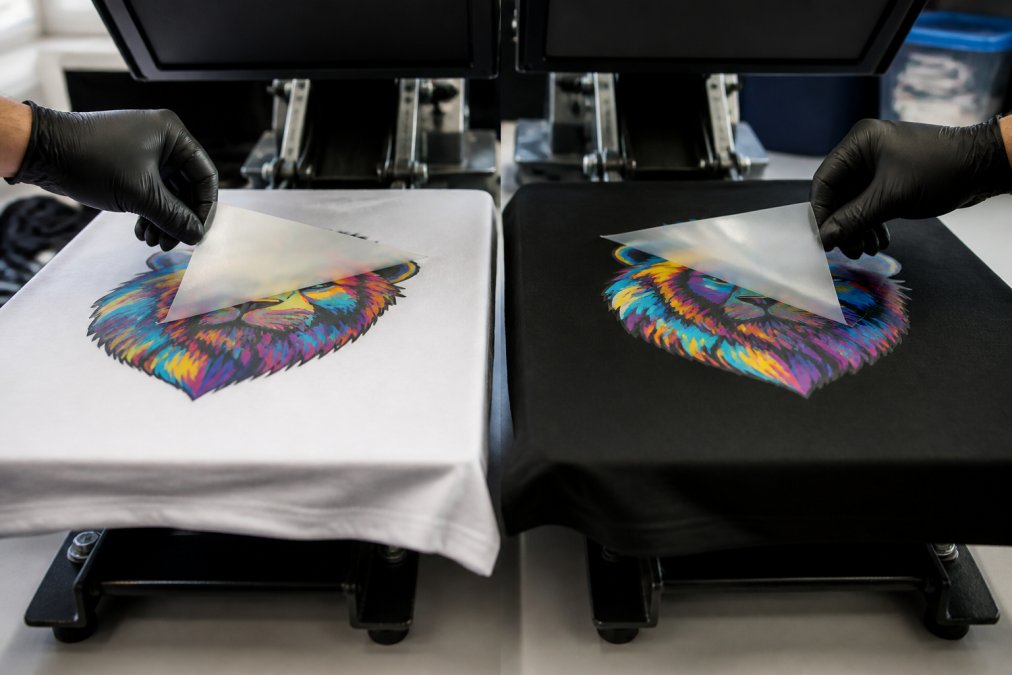
Poly-cotton blends sit between these two extremes. A 50/50 blend behaves closer to cotton, while an 80/20 poly-dominant fabric requires the same care as full polyester. If printing on polyester, lower your temperature and reduce dwell time to prevent scorching and dye migration.
Best Heat Press Settings for DTF Transfers
Getting the heat press settings right is the difference between a print that lasts 50 washes and one that peels after the first cycle. The core variables are heat press temperature, dwell time, and pressure settings, and each one interacts with the fabric type.
The adhesive powder (typically a thermoplastic polyurethane) needs to reach its full melt temperature to flow into the fabric weave and create a mechanical bond. If the fabric's own thermal limit is exceeded, you get fibre degradation, scorching, or dye migration.
Here is a practical melting point chart for common fabrics, which goes beyond the generic settings you'll find elsewhere:
| Fabric Type | Melting / Degradation Point | Recommended Press Temp | Dwell Time | Pressure | Peel Method |
|---|---|---|---|---|---|
| 100% Cotton | Decomposes ~210°C (no melt) | 160-165°C | 10-12 seconds | Medium-firm | Cold peel |
| 100% Polyester | Melts ~250°C, softens ~230°C | 150-155°C | 8-10 seconds | Light-medium | Cold peel |
| Poly-cotton 50/50 | Cotton dominates, poly softens ~230°C | 155-160°C | 10 seconds | Medium | Cold peel |
| Nylon 6,6 | Melts ~255°C, softens ~180°C | 135-145°C | 6-8 seconds | Light | Cold peel |
| Nylon 6 | Melts ~220°C, softens ~150°C | 130-140°C | 5-7 seconds | Light | Cold peel |
| Leather (finished) | No melt, but coating degrades ~170°C | 150-155°C | 8-10 seconds | Light, use protective sheet | Cold peel |
| Faux leather (PU) | PU coating degrades ~160°C | 140-150°C | 6-8 seconds | Light, use protective sheet | Cold peel |
| Elastane/Spandex | Degrades ~150°C, loses stretch | 135-145°C | 6-8 seconds | Light | Cold peel |
The critical takeaway from this chart: the gap between the adhesive's activation temperature (around 130°C) and the fabric's degradation point is your working window. For cotton, that window is huge, you have nearly 50°C of headroom. For nylon 6, that window is barely 10°C wide, which is why it fails so often.
Pressure is a variable that most guides gloss over. The pressure setting controls how deeply the melted adhesive penetrates the fabric. On cotton, medium-firm pressure (around 4-5 bar on a pneumatic press) forces adhesive into the weave for maximum mechanical grip. On polyester, the same pressure crushes the hollow fibres and creates a shiny, flattened appearance, a defect known as 'glazing'. For synthetics, reduce pressure to just enough to ensure full film-to-fabric contact (around 2-3 bar).
A note on dwell time and heat soak: the temperature you set on the platen is not the temperature the adhesive experiences. Thicker fabrics, fleece, heavyweight denim, terry towelling, absorb heat away from the transfer surface. A 300 gsm fleece will need 2-3 seconds longer dwell than a 150 gsm t-shirt at the same temperature because the fabric acts as a heat sink. Thin, slick fabrics like performance knit polyester heat up almost instantly, so shorter dwell times prevent overshooting the target temperature.
One unique angle worth claiming: most guides stop at the press settings, but they ignore the cooling phase. The rate at which the transfer cools after pressing affects adhesive crystallisation. A slow, controlled cool-down (leaving the garment under the press with the heat off for 5 seconds before removing) allows the adhesive to form a more uniform crystalline structure, improving initial adhesion strength. Rapid cooling can create amorphous regions in the adhesive that are more prone to delamination in the wash.
How to Apply DTF Transfers to Nylon and Other Tricky Fabrics
Nylon is one of the trickiest substrates for DTF printing because of its low melting point and slick surface. The critical rule is to keep the temperature well below 150°C and use the shortest dwell time that still activates the adhesive.
Start with a pre-press at a low temperature for 2-3 seconds. This removes moisture content and relaxes the fabric weave, giving the transfer a cleaner surface to bond with. Then apply the transfer at 135-145°C for 6-8 seconds with light pressure. Peel cold, always, a hot peel on nylon can pull the adhesive away before it has fully cured.
Waterproof nylon and coated technical fabrics present an additional challenge. The coating prevents the adhesive from penetrating, so prints may have reduced adhesion. For these materials, a fabric-specific primer or a lower-temperature, longer-dwell approach can help, but acceptance testing is essential before committing to production.
Silicone-coated fabrics and those with a high stretchability rating also need careful handling. The adhesive layer must be flexible enough to move with the fabric without cracking. Look for DTF films and adhesive powders marketed as high-stretch, and always test the print under tension to confirm the tensile strength holds.
Fabrics to Avoid and Common DTF Pitfalls
Some fabrics will never produce a reliable DTF print, no matter how carefully you adjust your settings. Water-repellent and coated fabrics top this list because the finish blocks the adhesive from bonding with the fibres. If water beads on the surface, the adhesive will not grip it.
Fabrics with a very loose, open weave can also cause problems. The adhesive powder may bleed through the gaps during curing, creating a rough texture on the back of the garment and reducing print opacity on the front. Tightly woven fabrics with a smooth surface give the best results.
Common DTF pitfalls include pressing with too much moisture in the fabric, which creates steam bubbles under the transfer, and using an inconsistent curing process that leaves the adhesive powder under-cured. Both lead to poor wash fastness and premature peeling. Pre-pressing every garment for 2-3 seconds removes residual moisture and relaxes the fibres before the main press.
Fabric softeners are another hidden culprit. They leave a residue on the surface that interferes with adhesion. If a customer brings in a pre-washed garment, press it briefly before applying the transfer to burn off any softener residue.
| Fabric Type | DTF Suitability | Main Risk | Recommended Action |
|---|---|---|---|
| Waterproof / coated nylon | Poor | Adhesive won't bond | Avoid or use primer |
| Silicone-coated fabrics | Poor | No adhesion at all | Avoid entirely |
| Very loose knits | Fair | Adhesive bleed-through | Use a backing sheet |
| Fleece / brushed back | Good | Fibre pile reduces detail | Press longer, lower temp |
| Denim | Good | Heavy weave needs more dwell | Increase dwell time |
Post-Print Care: Extending the Life of Your DTF Prints
The quality of your DTF print is determined as much by how the customer cares for it as by how you pressed it. Post-print care instructions by fabric type should be shared with every customer who buys custom apparel. The standard 'wash inside out in cold water' advice is not enough, different substrates fail in different ways, and the care regime should be tailored to the specific failure mode of each fabric.
Cotton and cotton-dominant blends (50/50 and above): Cotton's primary failure mode is abrasive wear on the print surface and adhesive breakdown from fabric softeners. The softener chemicals, typically quaternary ammonium compounds, plasticise the adhesive layer, making it tacky and prone to picking up lint, which dulls the print over time (PubMed).
- Wash inside out at 30°C with a gentle cycle. Avoid biological detergents containing enzymes, which can attack the adhesive's polyurethane backbone over repeated washes.
- Never use fabric softener. If a customer insists on softness, recommend a half-dose of white vinegar in the rinse cycle instead.
- Tumble dry on low heat (max 60°C) or hang dry. High heat in a dryer (above 70°C) softens the adhesive and can cause it to stick to itself when garments are folded warm.
- Ironing: if necessary, iron inside out on a cotton setting (200°C) but never directly on the print. Use a pressing cloth as a barrier.
Polyester and nylon (synthetics): Synthetic fabrics fail differently, the print itself may be fine, but the fabric around it can degrade, causing the print to wrinkle or delaminate as the substrate shrinks or distorts.
- Wash inside out at 30°C or below. Polyester's glass transition temperature is around 70°C, so hot washes (above 60°C) can cause the fabric to relax and shrink, which puts shear stress on the adhesive bond.
- Never tumble dry synthetics on high heat. The combination of heat and mechanical agitation is the single biggest killer of DTF prints on polyester. Hang dry is strongly preferred.
- Ironing: never iron directly on the print. Use a protective sheet and a low-temperature setting (max 110°C for polyester, 130°C for nylon). Even with a protective sheet, prolonged contact can melt the fibres.
- Nylon-specific warning: nylon absorbs moisture and can swell during washing. Always air dry nylon prints flat to prevent the fabric from stretching while wet, which can crack the adhesive.
Leather and faux leather: These substrates are the most sensitive to heat and moisture. Leather is a natural material that can dry out and crack, while faux leather (typically PU-coated) can delaminate from its backing fabric.
- Never machine wash leather or faux leather garments with DTF prints. Spot clean with a damp cloth and mild soap. The agitation and water immersion will degrade both the leather and the adhesive bond.
- Never tumble dry. Air dry away from direct heat sources.
- Store leather garments on padded hangers to avoid creasing the print. Faux leather should be stored flat or rolled, never folded sharply.
- Conditioning: for real leather, use a leather conditioner that does not contain silicone. Silicone-based conditioners leave a residue that prevents future adhesion if you need to re-press or add another transfer.
Stretch and recovery testing, a protocol competitors miss: Before you sell a batch of printed activewear or stretch garments, run a simple stretch test to verify the adhesive formulation matches the fabric's elasticity. Here is the protocol we recommend:
- Cut a 10cm x 10cm sample of the printed fabric.
- Mark two points 5cm apart across the print.
- Stretch the fabric to its maximum elongation and hold for 10 seconds.
- Release and measure the distance between the marks.
- Repeat 10 times.
If the print shows white stress lines (micro-cracks) after the first stretch, the adhesive is too rigid for that substrate. If the print delaminates at the edges after repeated stretching, the adhesive lacks sufficient elastic recovery. High-stretch fabrics (athletic wear with >20% elastane content) require a high-stretch adhesive powder, standard formulations will fail within weeks of regular wear.
Wash testing by fabric type: A standard domestic wash test (60°C, 30-minute cycle, tumble dried) is a good baseline, but it does not reflect real-world conditions. For a more accurate durability assessment, run a 30°C wash with a 40-minute cycle and hang dry, this mimics how most customers actually care for printed garments. Test at 10, 25, and 50 washes and document the failure mode:
- Cracking (adhesive too rigid), switch to a softer adhesive powder.
- Peeling at edges (under-cured adhesive), increase dwell time or temperature.
- Colour fading (dye migration from polyester), lower press temperature.
- Adhesive residue on the film (over-cured), reduce temperature or dwell.
A final note on customer communication: include a small care card with every order that specifies the wash, dry, and iron instructions for that specific fabric. Do not use a generic 'wash cold, dry low' label, customers ignore generic advice. A specific card that says 'This print will last 50+ washes if you wash inside out at 30°C and hang dry. Do not use fabric softener.' gives the customer a clear expectation and protects you from warranty claims based on improper care.
Conclusion: Choosing the Right Fabric for Your Project
Choosing the right fabric for DTF printing comes down to matching the substrate to your application. Cotton offers the easiest application and best colour opacity, making it ideal for everyday apparel and promotional products. Polyester works well for activewear when you respect its lower temperature threshold. Nylon and coated fabrics require extra care and testing before you commit to production.
For your next custom apparel run, start with the settings above, test on scrap fabric, and document the results. A reliable supplier makes this easier. BB5wholesale provides high-quality DTF transfers with an intuitive gang sheet builder, fast door-to-door delivery, and 24/7 customer support to help you get the best value for your printing needs. Upload your gang sheet and get your designs onto the right fabric today.
Frequently Asked Questions
Can I use DTF printing on any fabric?
No, DTF printing on fabrics works best on materials with a high cotton content or a tight weave. Natural fibres like cotton and cotton-poly blends give the strongest bond and most vibrant colour. Smooth synthetics such as nylon or waterproof materials need lower temperatures and careful pressure to avoid scorching. Always test a sample piece first to confirm the transfer adheres correctly before committing to a full run.
What is the best heat press settings for DTF on polyester?
For polyester, set your heat press to around 150°C to 160°C with medium pressure. This is lower than the 160°C to 170°C used for cotton because polyester can scorch or melt at higher temperatures. Use a cold peel and check the transfer film releases cleanly. Polyester also benefits from a lower dwell time of 8 to 10 seconds to prevent fibre migration.
Can you use DTF transfers on nylon or waterproof fabrics?
Yes, but it requires care. Nylon and waterproof fabrics are sensitive to heat, so use a lower temperature around 120°C to 130°C with a silicone sheet or parchment paper as a barrier. Press for a shorter dwell time, about 5 to 7 seconds, and always use a cold peel. The results are less durable than on cotton, so test for wash fastness before production.
How long does DTF last on shirts?
A well-pressed DTF transfer on a cotton or poly-cotton garment lasts 40 to 50 washes without cracking or peeling. Durability depends on the fabric weave, the heat press settings, and how the item is cared for. Washing inside out in cold water and avoiding tumble drying extends the print's life. Choosing a fabric with a tight weave also improves adhesion and longevity.